

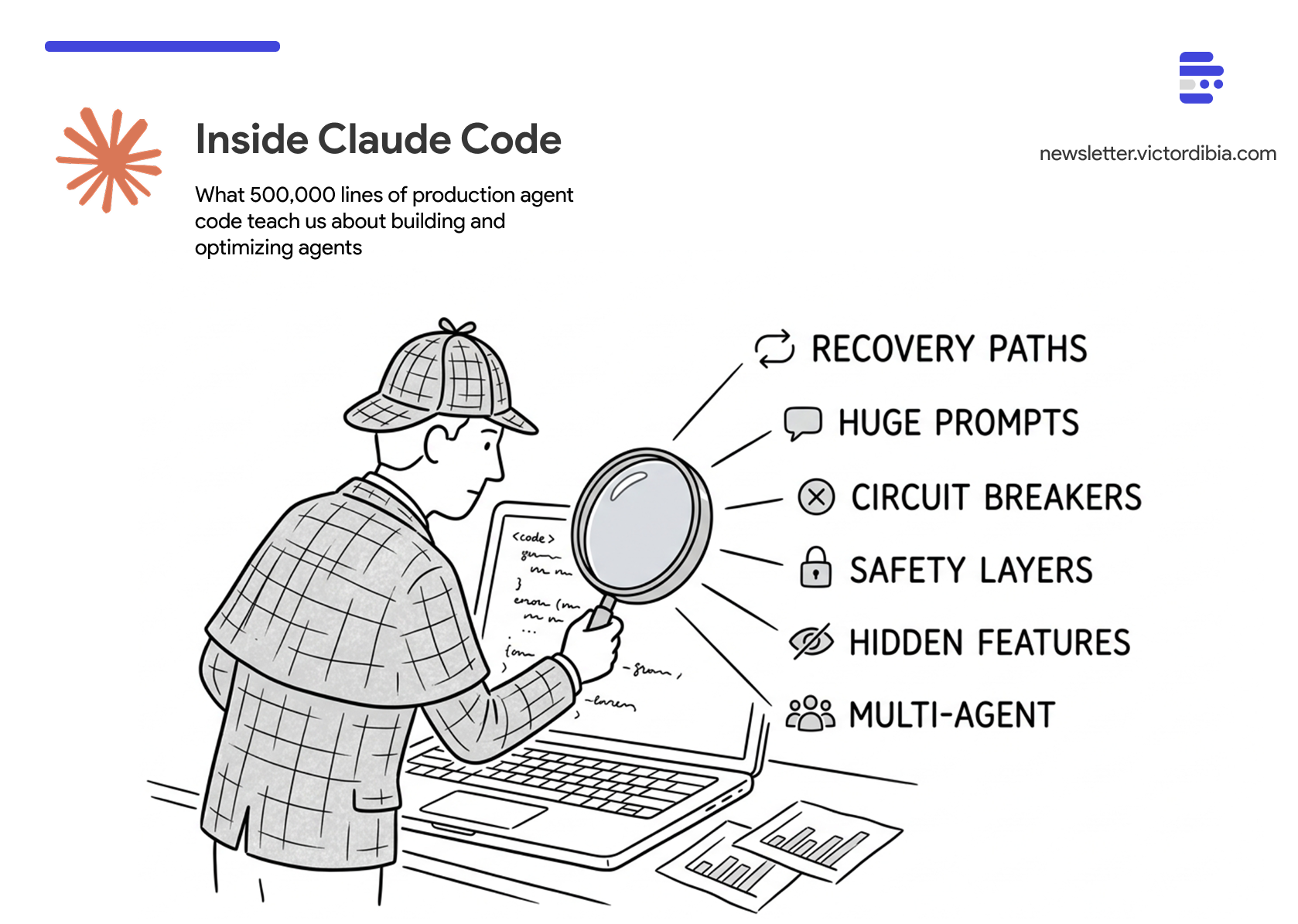
Recently (March 31, 2026), the full TypeScript source for Claude Code shipped (accidentally) as part of the @anthropic-ai/claude-code npm package. This provided a rare look inside how Anthropic built a production agent harness used by hundreds of thousands of developers. I spent time reading through the code, running analysis scripts, and digging into the design choices made by the Claude Code team. This post collates the findings.
TLDR;
Most of the code is NOT the agent loop. The loop is ~1,700 lines. The other 511,000 lines are the harness.
Prompts are the largest engineering investment you can’t see. ~60,000 tokens of prompt text across 37 tool prompts, the system prompt, and a compaction prompt. The BashTool prompt alone is longer than most agent tutorials.
Context management is a pipeline, not a single operation. Three tiers that compose - budgeting, microcompaction, full compaction - each handling a different shape of growth.
Every automated recovery path needs a circuit breaker. A missing retry cap let 1,279 sessions run 50+ consecutive compaction failures each, wasting ~250K API calls per day before the team noticed.
Safety code compounds. 38,000 lines - 7.5% of the codebase - devoted to permissions and security. Every new tool, deployment mode, and model version adds more.
The line between single-agent and multi-agent is blurred. 90 feature flags reveal multi-agent coordination, background memory consolidation, and verification agents behind feature gates.
Alot of the insights came from both reading the code, and comments by the engineers, in the code. For context, this builds on previous posts about the agent execution loop and building your own Claude Code from scratch.
This post is part of a series adapted from Designing Multi-Agent Systems, which covers agent architecture, tool design, and context engineering with full implementation code.
By the Numbers
Before diving into lessons, here’s the shape of the codebase. I wrote a Python script that walks the full source tree and generates these charts. The numbers are from the March 31, 2026 npm code.
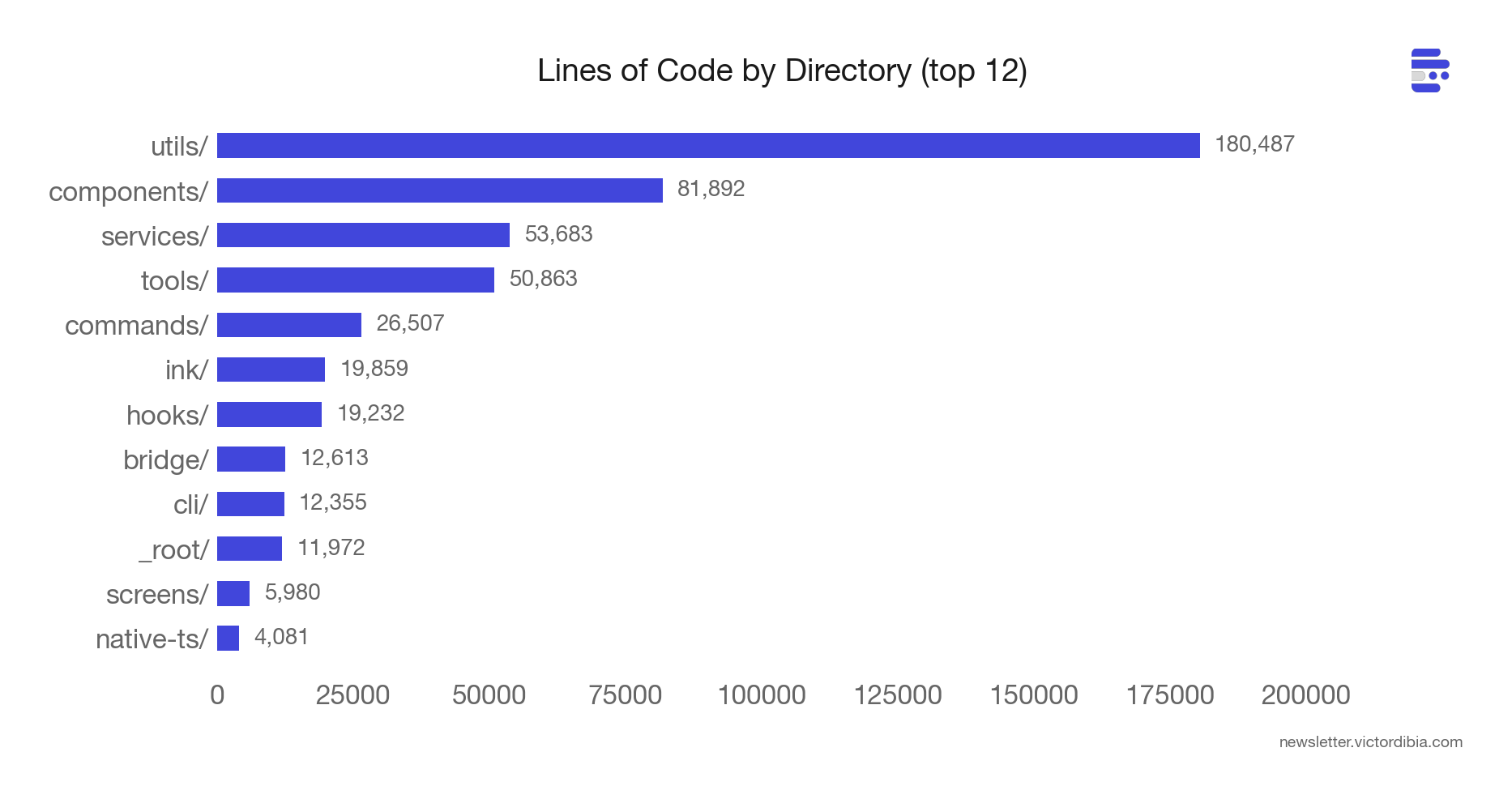
513,216 lines of TypeScript across 1,884 files. 42 tools. 90 feature flags.
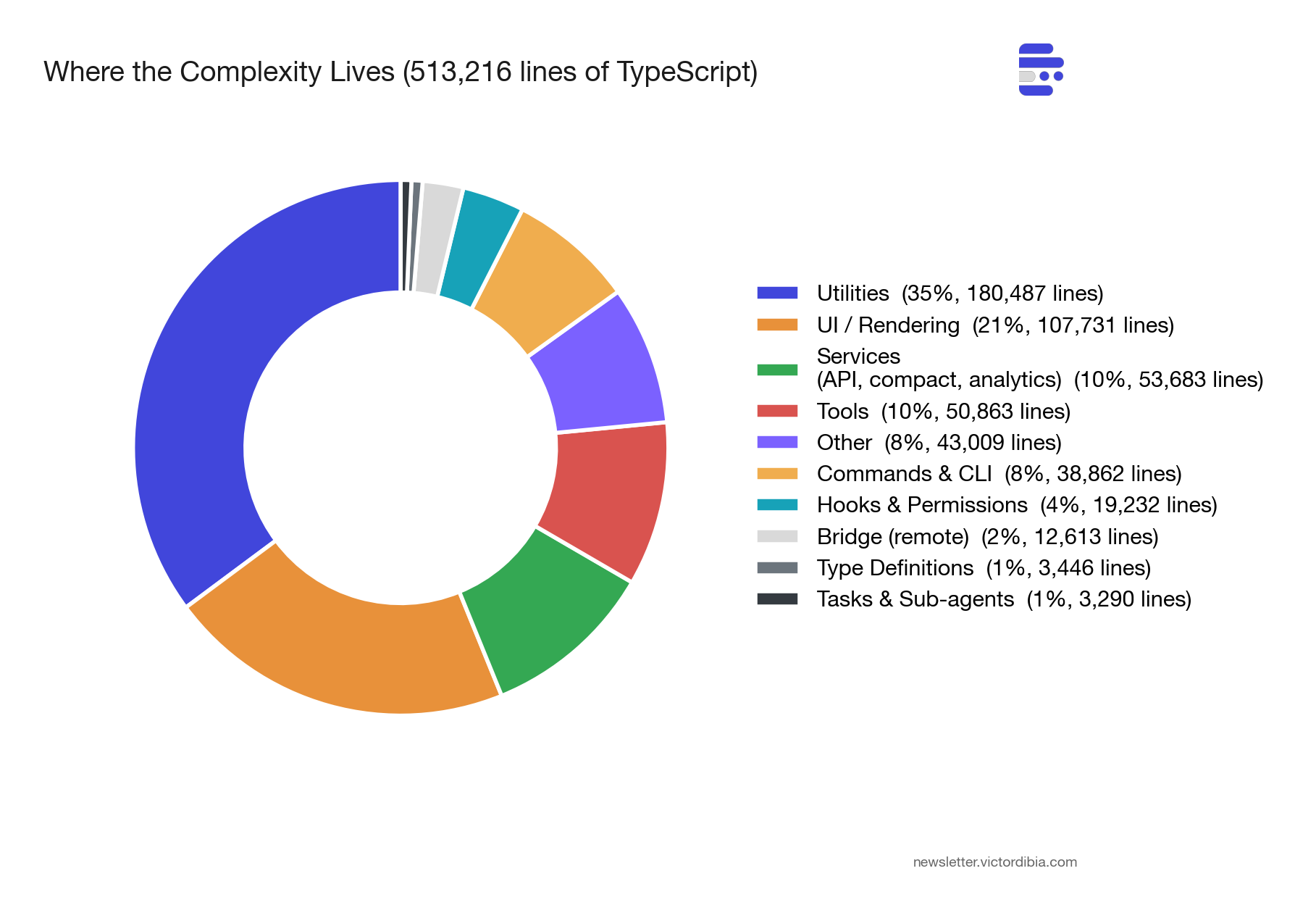
The biggest surprise: utils/ is the largest directory at ~180,000 lines (35% of the codebase). The infrastructure that supports the agent - model routing, permission management, config loading, analytics, error handling - outweighs the agent itself by a wide margin.
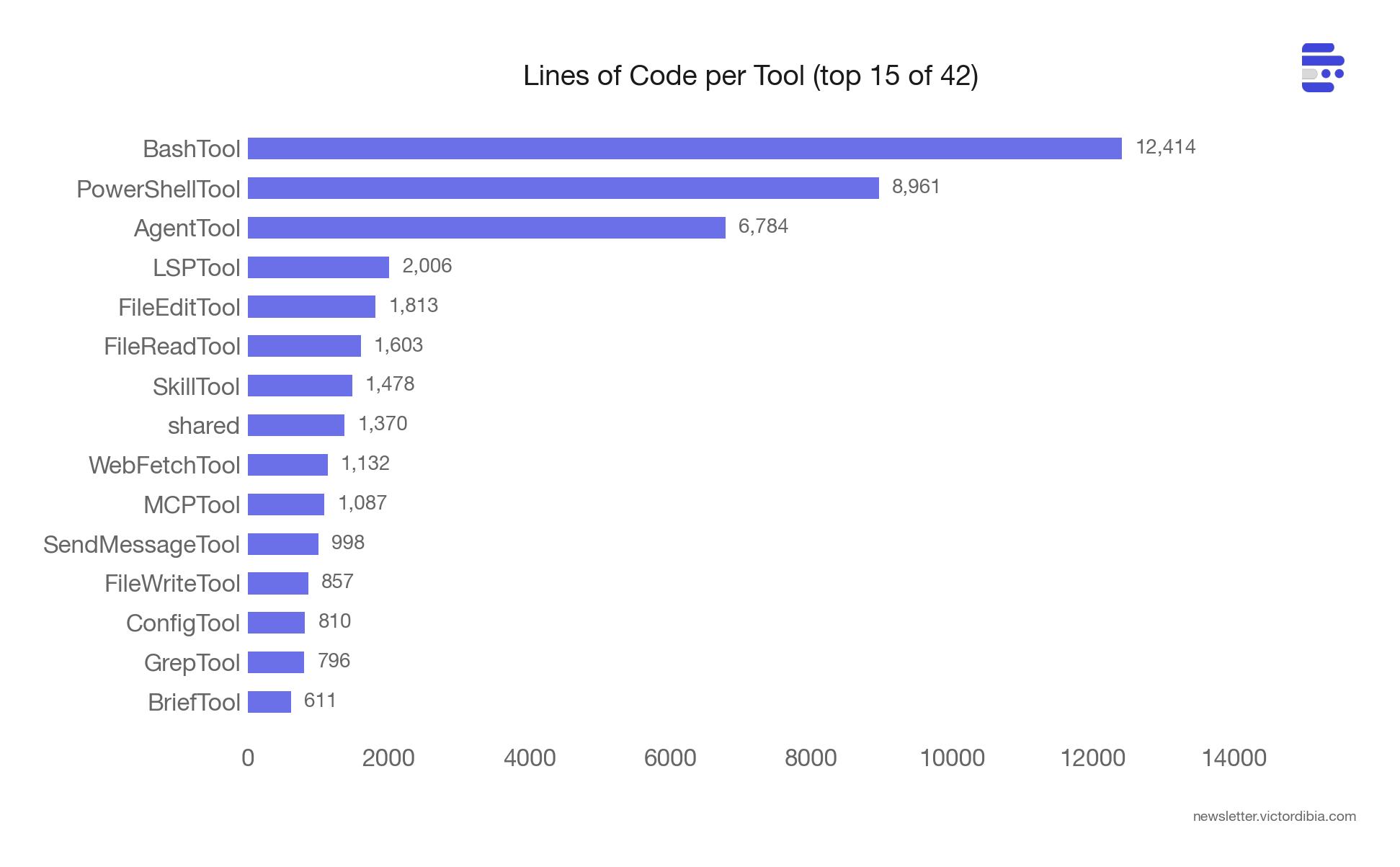
BashTool is 12,414 lines - larger than many complete agent frameworks. The tool itself (BashTool.tsx) is 1,143 lines. The remaining ~11,000 lines are safety infrastructure:
bashPermissions.ts (2,621 lines) - permission rule matching, classifier integration, allowlist logic
bashSecurity.ts (2,592 lines) - 20+ AST-based security checks (injection, substitution, obfuscation detection)
readOnlyValidation.ts (1,990 lines) - determining which commands are safe to auto-approve (allowlists for git, docker, ripgrep, pyright, gh CLI subcommands and their flags)
pathValidation.ts (1,303 lines) - preventing writes outside allowed directories
sedValidation.ts (684 lines) - an entire validation system just for
sedcommands (because the model loves usingsedto edit files, andsedcan do almost anything)
The tool is 10% execution logic, 90% “making sure the execution is safe.”
PowerShellTool is 8,961 lines - a ground-up reimplementation (not a port of BashTool) with PowerShell-specific threats: download cradles (Invoke-WebRequest | Invoke-Expression), COM object abuse, Constrained Language Mode bypass detection, dynamic command names via variables, and module loading attacks. Windows shell security is a different threat model from Unix, and the code appears to be engineered to reflect that.
AgentTool - which manages sub-agent spawning - is 6,784. The long tail of smaller tools (Glob, Grep, Sleep) are 50-300 lines each. The complexity concentrates where the attack surface is largest.
Lesson 1: Most of the Code Isn’t the Agent Loop
The core loop in Claude Code’s query.ts is recognizable. It’s a while (true) that calls the Claude API, collects tool_use blocks from the response, executes them, pushes tool_result messages back, and loops. This mirrors the agentic loop described in the agent execution loop and building your own Claude Code.
But the loop carries a State object with 10 fields:
type State = {
  messages: Message[];
  toolUseContext: ToolUseContext;
  autoCompactTracking: AutoCompactTrackingState | undefined;
  maxOutputTokensRecoveryCount: number;
  hasAttemptedReactiveCompact: boolean;
  maxOutputTokensOverride: number | undefined;
  pendingToolUseSummary: Promise<ToolUseSummaryMessage | null> | undefined;
  stopHookActive: boolean | undefined;
  turnCount: number;
  transition: Continue | undefined;
};
Lots of nuggest here. The transition field records why the loop continued on its previous iteration: was it a normal tool execution turn? A recovery from a prompt-too-long error? A max-output-tokens escalation? Every continuation has a name, which makes debugging and telemetry straightforward.
The loop has five distinct recovery paths before giving up on an API error:
Collapse drain - drain staged context collapses (cheap, no LLM call)
Reactive compact - full LLM summarization when
prompt_too_longfiresMax output token escalation - bump from 8k to 64k and retry
Max output token multi-turn recovery - inject a “please continue” message
Schema-not-sent recovery - re-inject tool schemas via a ToolSearch round-trip
Every known error class has an automated recovery path. prompt_too_long triggers compaction. Max output tokens triggers escalation from 8k to 64k. The user sees none of this - the loop absorbs failures silently and only surfaces errors after all recovery options are exhausted.
That loop is ~1,700 lines. The other 511,000 lines are the reasons it can run reliably for 50+ turns. Tool orchestration, permission management, context budgeting, analytics, error classification, session memory, model routing, config loading. The loop is where the agent runs. Everything else is where the agent survives.
In most implementations, the loop stabilizes early. The harness - tool safety, context management, error recovery, permissions (all towards catching edge cases as they arise) - is where the engineering effort accumulates over time.
Lesson 2: Prompts Are the Largest Engineering Investment You Can’t See
I expected the system prompt to be large. In Chapter 11 of the Designing Multi-Agent Systems book, I call out poor instructions as 1 of 10 reasons multi-agent systems fail. But ~60,000 tokens of prompt text spread across the codebase is larger than most engineering teams would anticipate.
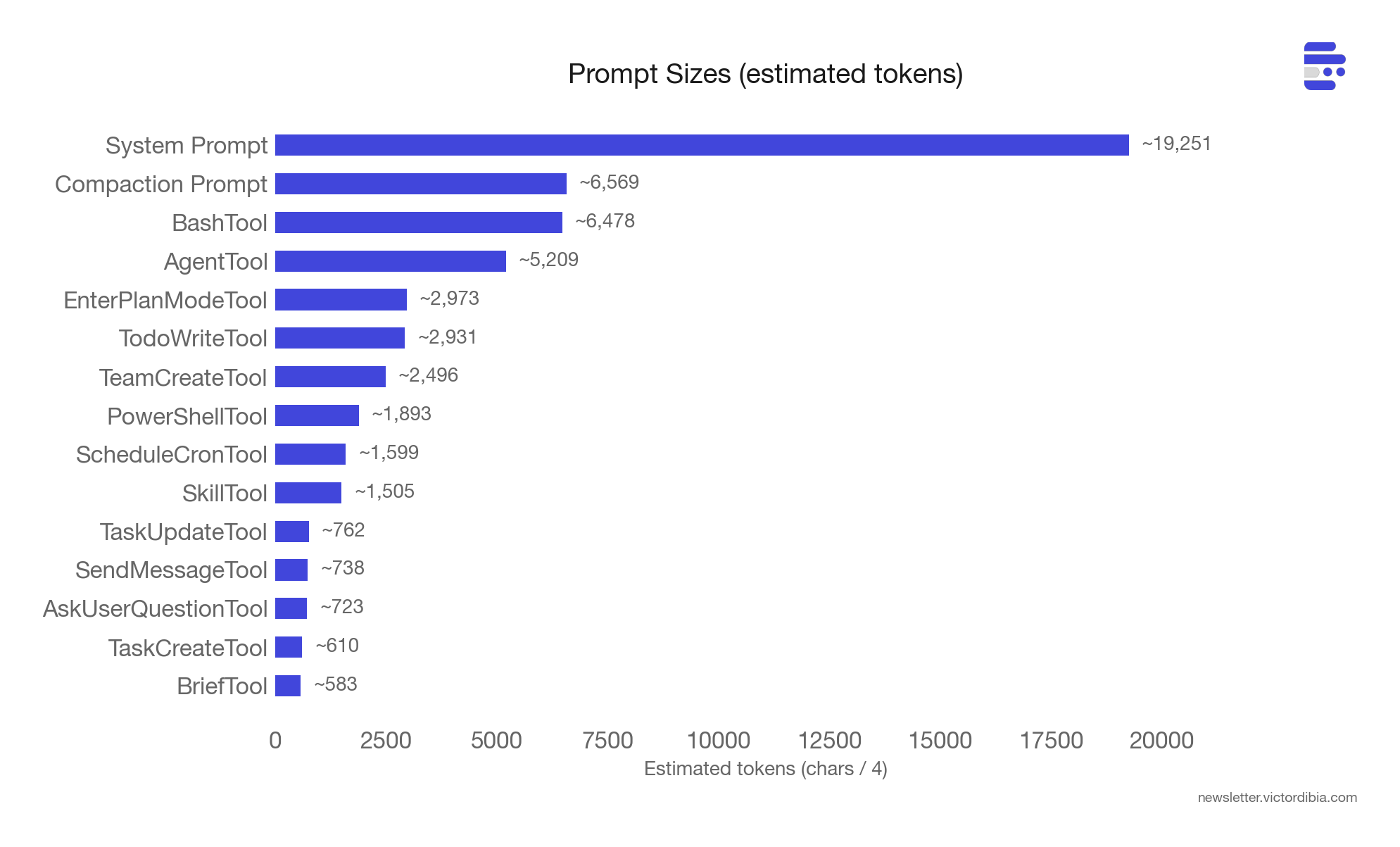
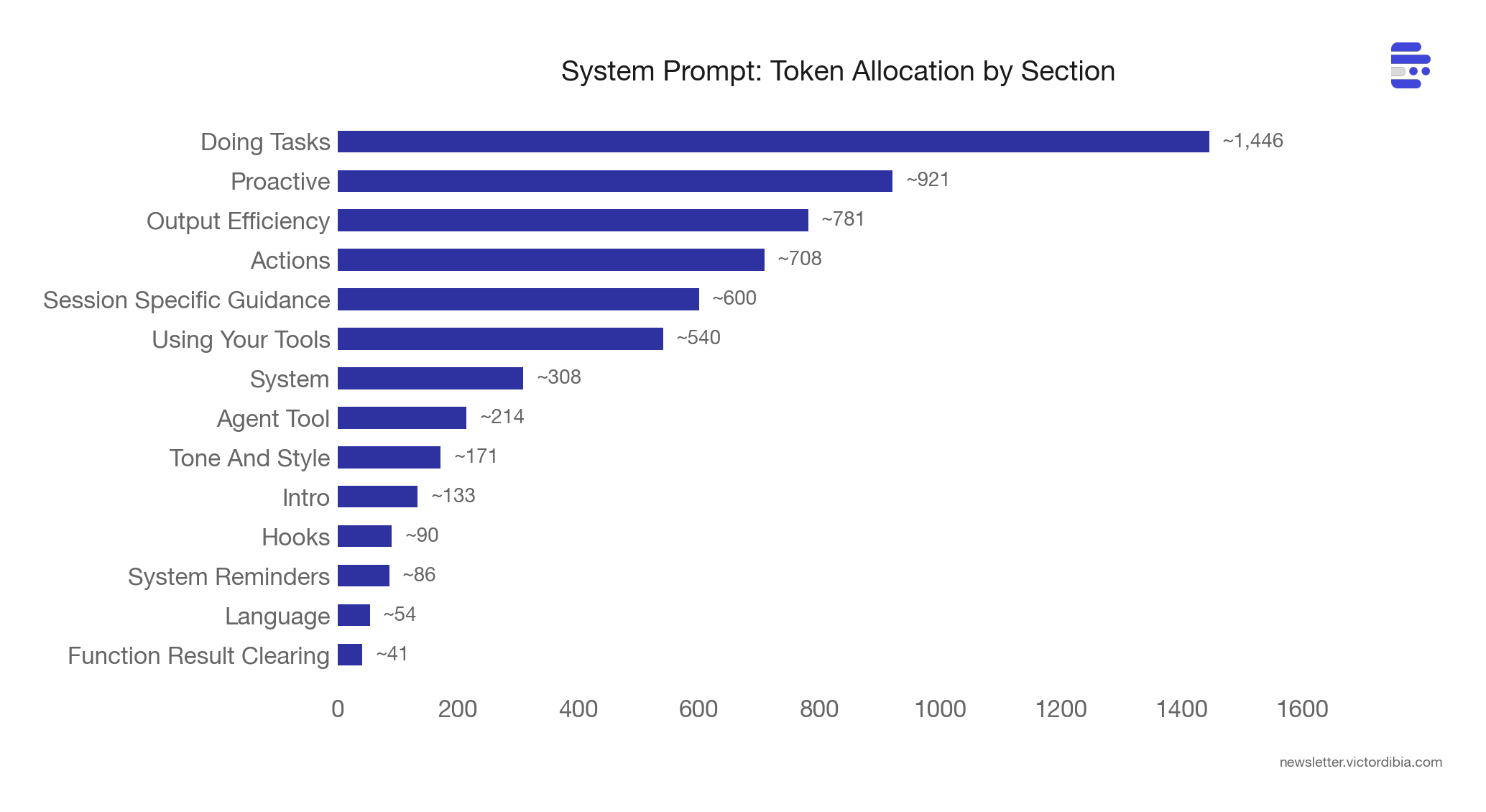
The system prompt alone is ~19,000 tokens, built from ~15 composable section functions (getSimpleIntroSection, getUsingYourToolsSection, getSimpleDoingTasksSection, etc.) with a SYSTEM_PROMPT_DYNAMIC_BOUNDARY marker splitting cacheable content from session-specific content. This boundary exists because Anthropic’s prompt caching charges less for cache hits - so everything before the boundary stays stable across turns, and everything after (session-specific guidance, MCP instructions) changes freely.
The tool prompts are where the bulk of the investment goes.
The BashTool prompt is ~6,500 tokens. It contains a full anti-pattern catalog: don’t use cat for large files (use head/tail), don’t add docs to code you didn’t change, don’t amend commits after a git hook failure (because the hook already succeeded and --amend would modify the previous commit), don’t use -i flags (interactive mode doesn’t work in a non-interactive shell). Each of these is a concrete failure mode that likely happened at scale, was detected and got encoded into the prompt.
The system prompt’s getSimpleDoingTasksSection is equally opinionated - and these opinions likely come from watching the model fail in practice. These are direct quotes from the source:
“Don’t add features, refactor code, or make improvements beyond what was asked”
“Don’t create helpers or abstractions for one-time operations. Three similar lines of code is better than a premature abstraction.”
“Don’t add error handling for scenarios that can’t happen. Only validate at system boundaries.”
The prompt is annotated with @[MODEL LAUNCH] markers (49 across 26 files) that flag sections needing review when a new model version ships. One marker reads: “False-claims mitigation for Capybara v8 (29-30% FC rate vs v4’s 16.7%).” Some rules apply only to specific models. Some get relaxed as models improve. The prompt evolves with the model.
The compaction prompt (~6,500 tokens) shows how model-specific prompt tuning works in practice. When Claude Code compacts a conversation, it spawns a forked sub-agent whose only job is to produce a text summary. That fork inherits the parent’s full tool set - not because it needs tools, but because Anthropic’s prompt caching matches on tool definitions. Different tools means a cache miss, which means reprocessing the entire system prompt from scratch. So the fork keeps the tools for the cache hit.
The side effect of this tool inclusion is that the model sees 42 available tools and sometimes may try to use them instead of writing the summary. On Sonnet 4.5, this happened 0.01% of the time. On Sonnet 4.6, it jumped to 2.79% (per comments in prompt.ts). Since the fork runs with maxTurns: 1, a tool call means no summary output - the compaction fails silently. The fix is a blunt preamble:
CRITICAL: Respond with TEXT ONLY. Do NOT call any tools.
Tool calls will be REJECTED and will waste your only turn - you will fail the task.
This prompt exists because of a specific regression on a specific model version, caught by telemetry, fixed by steering language. Prompt engineering at scale is reactive - you discover failure modes from production data, not from first principles.
Lesson 3: Context Management Is a Pipeline, Not a Single Operation
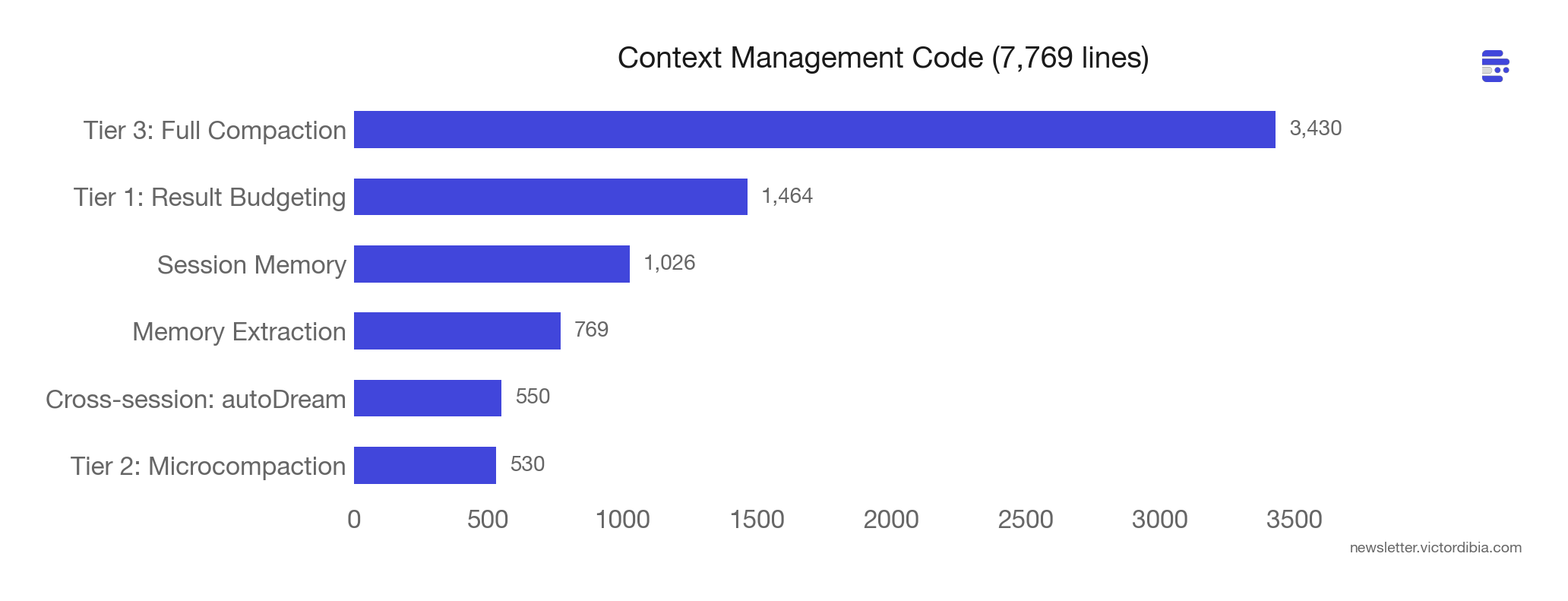
In the previous post, I covered compaction as a single operation - when context gets too big, summarize/trim/reduce it. Claude Code has three tiers that compose into a pipeline. Before each API call, the loop runs through them in order: budget -> microcompact -> full compaction.
Tier 1: Tool Result Budgeting (per-result)
Before results even enter the conversation, large outputs get persisted to disk and replaced with a 2KB preview plus a file path. The model can use the Read tool to fetch the full output on demand. This is demand-paging for context - keep the summary in working memory, the full data on disk (similar to the progressive disclosure pattern used in skills).
Each tool declares a maxResultSizeChars threshold (default 50k chars). The Read tool opts out entirely (threshold set to Infinity) because persisting its output to a file that the model reads back with Read would be circular.
Tier 2: Microcompaction (selective clearing)
Clears results from specific tool types: Read, Bash, Grep, Glob, WebFetch, Edit, Write. Uses a time-based trigger: if the gap since the last assistant message exceeds a threshold, the server-side prompt cache has expired anyway. So it clears stale tool results before the request - no point paying to re-cache content the server already forgot.
Tier 3: Full Compaction (LLM summarization)
Triggers when context exceeds contextWindow - reservedForSummary - 13,000 token buffer. Uses Claude itself to summarize the conversation into nine structured sections:
Primary Request and Intent
Key Technical Concepts
Files and Code Sections (with full snippets)
Errors and fixes
Problem Solving
ALL user messages (non-tool-results)
Pending Tasks
Current Work (with file names and code)
Optional Next Step - with verbatim quotes from the recent conversation
That last requirement - verbatim quotes - prevents the most common compaction failure: intent drift. After summarization, the agent might subtly reinterpret what the user asked for. Requiring exact quotes anchors the summary to the user’s actual words.
After summarization, Claude Code re-injects the last 5 file attachments (up to 5K tokens each), active skills (up to 25K total), plan state, and tool/MCP delta attachments. Compaction here is structured extraction followed by selective reconstruction, and the schema is tuned to what matters for SWE tasks - file paths, code snippets, error history. For other domains (legal, medical), the compaction schema would likely look very different.
A single iteration might budget a large Bash result (tier 1), clear old Grep results because the cache is cold (tier 2), and still need full compaction because the conversation has been running for 40 turns (tier 3). Each tier handles a different shape of context growth.
Beyond these three tiers, there’s also cross-session memory. A flagged autoDream subsystem runs background memory consolidation between sessions using a three-gate system (cheapest check first): time since last consolidation -> session count since last consolidation -> lock check. It fires a /dream prompt as a forked sub-agent to extract patterns across sessions. Context management at every time scale.
Lesson 4: Every Recovery Path Needs a Circuit Breaker
The code has comments referencing internal bug queries (BQ) with specific dates and numbers. Three stood out:
BQ 2026-03-10: “1,279 sessions had 50+ consecutive compaction failures (up to 3,272) in a single session, wasting ~250K API calls/day globally.”
The fix: MAX_CONSECUTIVE_AUTOCOMPACT_FAILURES = 3. Three lines of code. The problem went unnoticed because autocompact failures were silent - the retry logic just kept trying, turn after turn. Without telemetry, this looked like normal API traffic.
BQ 2026-03-12: “~98% of ws_closed events never recover via polling alone.”
When Claude Code’s WebSocket bridge disconnects, it falls back to HTTP polling. But the data seemed to show that 98% of disconnected sessions never recovered through polling. 147,000 sessions per week hit poll 404s. The fix was a full reconnect state machine with two strategies: reconnect-in-place (same environment ID) or fresh session fallback.
BQ 2026-03-01: “Missing [cache invalidation] made 20% of tengu_prompt_cache_break events.”
A subtle one. Microcompaction changes the system prompt, which should invalidate the prompt cache. Missing this invalidation meant 20% of prompt cache breaks were caused by the system’s own context management, not by actual content changes. The fix was adding a single flag check after microcompaction.
There are 20 circuit breaker constants across the codebase:
MAX_CONSECUTIVE_AUTOCOMPACT_FAILURES = 3(services/compact)MAX_529_RETRIES = 3(API overload responses)MAX_CONSECUTIVE_FAILURES = 5(remote session polling - “a 30min poll makes ~600 calls; at any nonzero 5xx rate one blip would kill the run”)MAX_REFRESH_FAILURES = 3(JWT token refresh)MAX_SESSION_RETRIES = 1(MCP connections)MAX_COMPACT_STREAMING_RETRIES = 2(streaming compaction)And 14 more.
Every automated recovery path in the codebase has a corresponding circuit breaker that caps retries. The numbers are small (1-10), the comments explain why, and the BQ references show the cost of getting it wrong. Without a maximum, the recovery becomes the problem.
Lesson 5: Safety Scales Faster Than Features
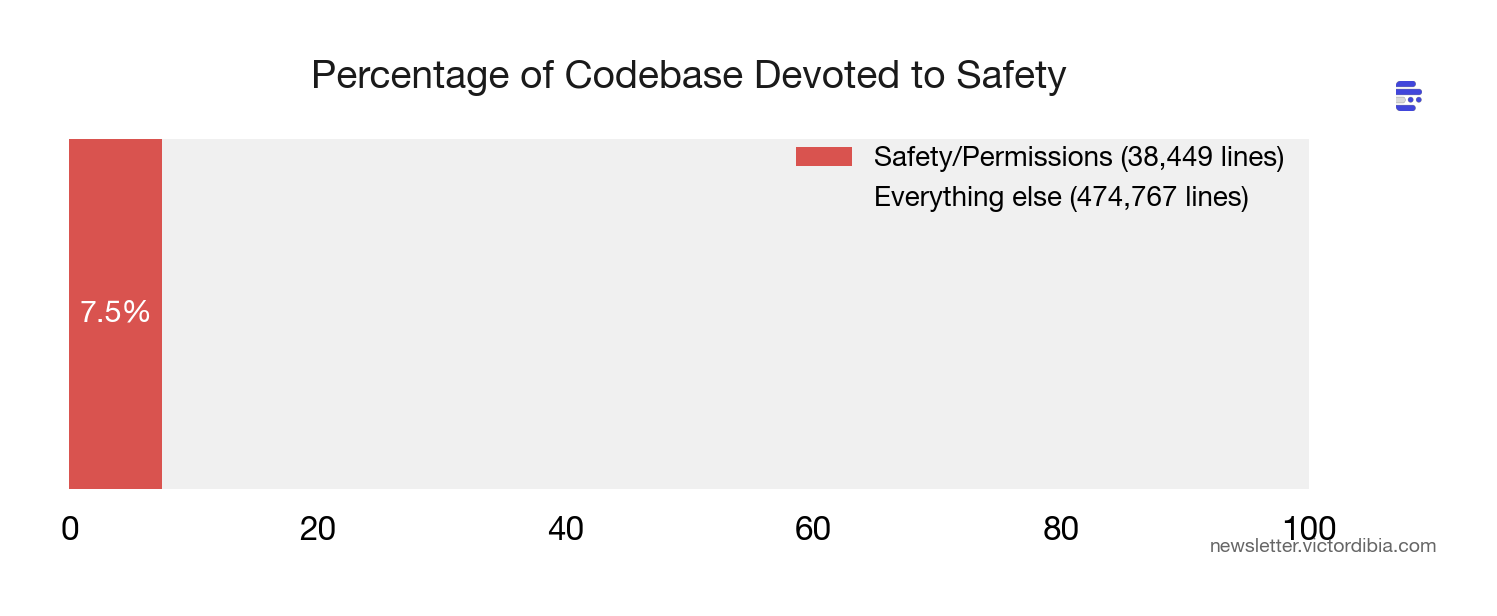
38,449 lines. 7.5% of the entire codebase. Devoted to permissions and security.
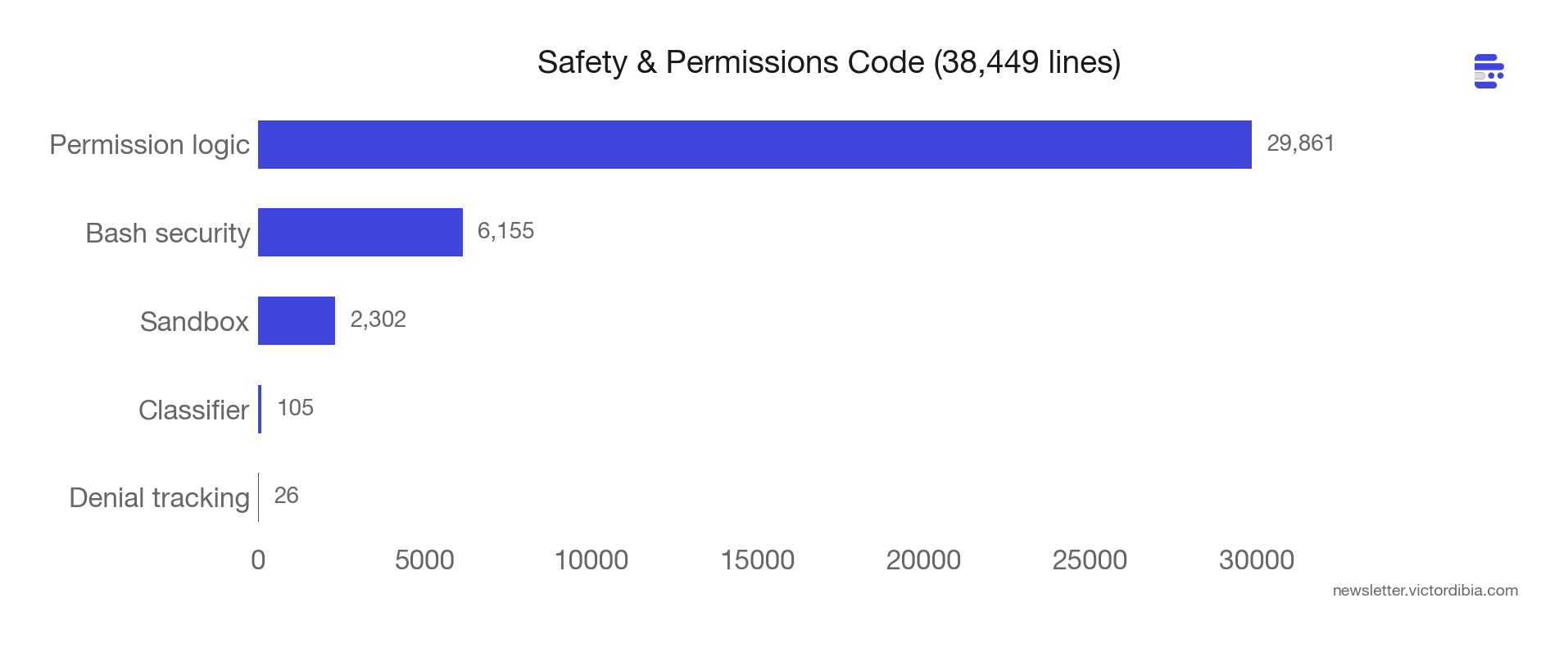
The BashTool alone has 20+ security checks using tree-sitter AST analysis (not regex). These detect:
Process and command substitution (
$(),<())Zsh-dangerous builtins (
zmodload,zpty,ztcp)Obfuscated flags
Unicode whitespace injection
IFS injection
Control character attacks
Brace expansion attacks
Separately, destructiveCommandWarning.ts matches patterns like git reset --hard, rm -rf, DROP TABLE, and kubectl delete. These warn but don’t block - the distinction matters. A destructive command isn’t necessarily wrong, it just needs explicit confirmation.
The full permission flow for a bash command goes through four layers:
Config rules (fastest) - pre-computed allow/deny lists like
Bash(npm:*)orBash(git reset --hard:exact)Hooks (extensible) - user-defined shell scripts that can approve, deny, or modify the input
Classifier (ML-based) - safety classifier for ambiguous commands
User dialog (fallback) - interactive prompt if still undecided
Each layer can short-circuit. Config rules handle the fast path. Hooks handle org-specific policies. The classifier catches edge cases. The user dialog is the last resort. The system is designed so that most tool calls resolve at layer 1 (fast, no user interaction) and only genuinely ambiguous ones reach layer 4.
Sub-agents add another dimension: permission boundaries. A sub-agent can’t show a UI dialog, so any undecided permission prompt is auto-denied. Hooks can pre-approve specific operations - that’s how sub-agents get permission to run npm test without human interaction. Abort controllers link parent to child (parent abort cascades down, child failure doesn’t kill parent). Task registration always reaches the root store so background bash processes spawned by sub-agents don’t become zombies.
The system prompt itself encodes safety as behavioral guidance. The getActionsSection function generates rules like (quoting from the source): “measure twice, cut once”, never skip hooks (--no-verify), never force-push to main, investigate unfamiliar files before deleting them (they might be the user’s in-progress work). These read like incident post-mortems compressed into one-liners.
The cron scheduler (for scheduled remote agent runs) has an interesting detail: it deliberately avoids scheduling at :00 and :30 marks to prevent fleet-wide API spikes when thousands of agents all fire simultaneously.
Safety code grows superlinearly with capability. Every new tool needs permission logic. Every new model needs prompt tuning. Every new deployment mode (remote, sub-agent, headless) needs its own permission boundary. This is the part of agent development that doesn’t get easier.
Lesson 6: The Single-Agent Is Becoming a Team
The codebase contains 90 feature flags, gated behind Bun’s build-time dead code elimination. Most aren’t shipped to external users. But they reveal the trajectory.
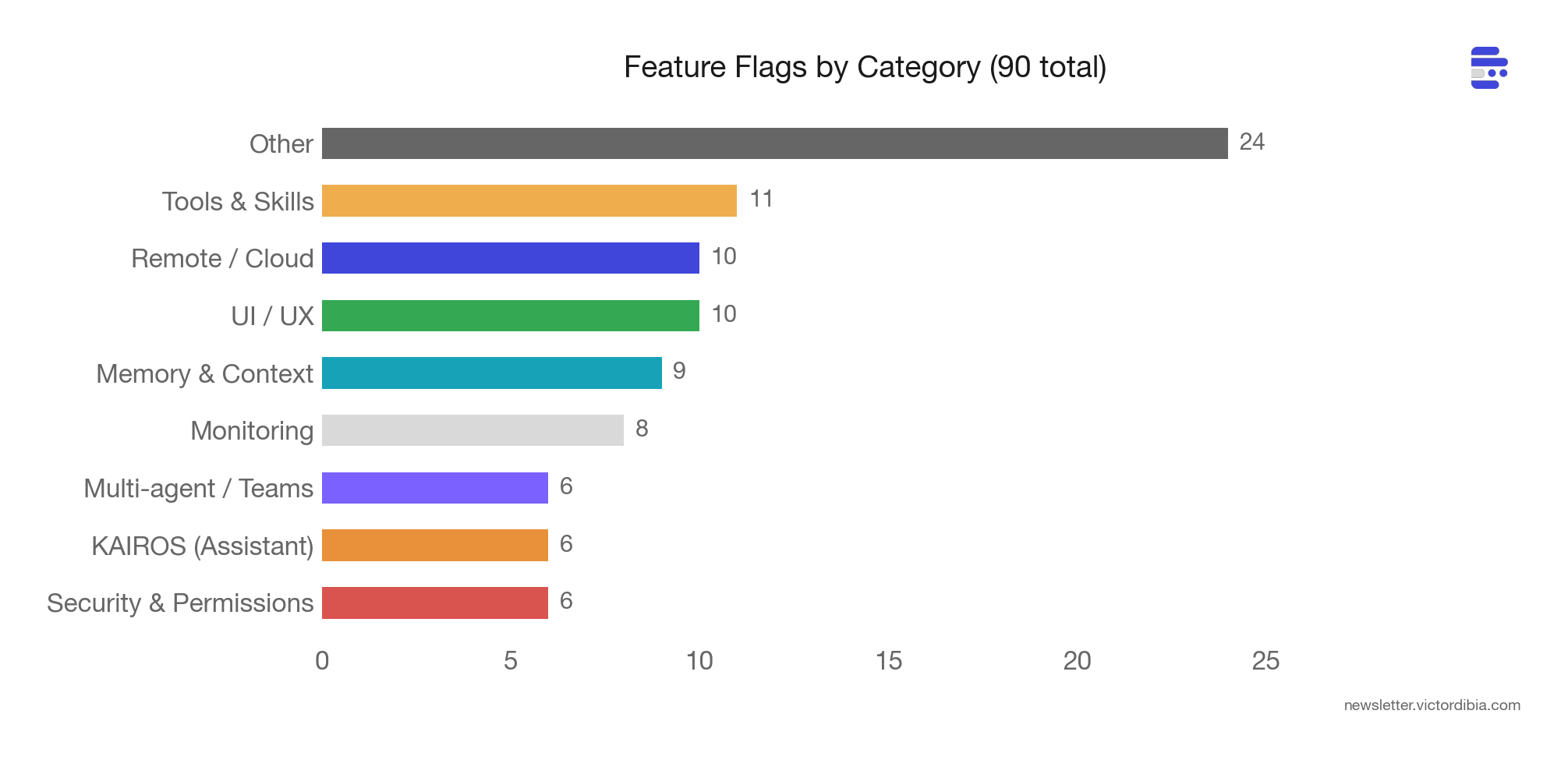
Six flags are explicitly multi-agent:
COORDINATOR_MODE - a full coordinator system prompt that spawns parallel workers for Research, Synthesis, Implementation, and Verification phases
VERIFICATION_AGENT - an adversarial read-only agent that tries to break implementations, auto-triggered after 3+ file edits, producing PASS/FAIL/PARTIAL verdicts
TEAMMEM - server-synced team memory shared across all authenticated org members for a given repo
UDS_INBOX - Unix Domain Socket messaging between Claude instances on the same machine
FORK_SUBAGENT - forked sub-agent execution model
BUILTIN_EXPLORE_PLAN_AGENTS - built-in Explore and Plan agent modes
The assistant mode subsystem (internal codename KAIROS) adds six more flags: background memory consolidation (KAIROS_DREAM), proactive briefings (KAIROS_BRIEF), GitHub webhook subscriptions (KAIROS_GITHUB_WEBHOOKS), push notifications (KAIROS_PUSH_NOTIFICATION), and channel integrations (KAIROS_CHANNELS).
The autoDream system is particularly interesting. It runs a /dream prompt as a forked sub-agent between sessions to consolidate memories. It uses a three-gate system ordered cheapest-first: time gate (hours since last consolidation) -> session gate (enough new sessions to justify it) -> lock gate (no other process mid-consolidation).
And then there’s the buddy system: 18 ASCII-art companion species with gacha rarity tiers (common to legendary), RPG stats (DEBUGGING, PATIENCE, CHAOS, WISDOM, SNARK), and a model-generated “soul” for each companion. This is what happens when engineers love their product.
The patterns from lessons 1-5 - the recovery paths, the tiered context management, the permission boundaries, the circuit breakers - are the building blocks for these multi-agent systems.
Beyond the multi-agent flags, the codebase contains full implementations of features gated behind feature() checks that don’t ship in the external build. A few notable ones:
Voice mode (VOICE_MODE) - voice input/output using claude.ai’s voice_stream endpoint. Creates a /voice command. Kill-switched via a server-side GrowthBook flag.
Native web browser (WEB_BROWSER_TOOL, codename “bagel”) - a browser tool using Bun’s native WebView. Shows the active page URL in a footer pill with a sticky panel. A full browser inside the terminal agent.
Remote planning (ULTRAPLAN) - teleports the planning phase to a cloud browser session. Has a full state machine: running -> needs_input -> plan_ready -> approved/rejected. The user reviews and approves the plan in a browser UI before the agent executes.
Deep link protocol (DIRECT_CONNECT) - a cc:// URL protocol with an HTTP session server, auth tokens, unix sockets, idle timeouts, and max session limits. Creates claude server, claude connect <url>, and claude open <cc-url> commands.
Self-hosted runner (SELF_HOSTED_RUNNER) - a register-and-poll worker service for bring-your-own-compute deployments. Paired with BYOC_ENVIRONMENT_RUNNER for headless execution.
Anti-distillation (ANTI_DISTILLATION_CC) - sends fake tool definitions in API calls to prevent other companies from distilling model behavior by observing Claude Code’s API traffic.
Stickers (STICKERS) - opens stickermule.com/claudecode in the browser. Registered as a slash command. The most wholesome feature flag in the codebase.
Hidden Gems
Beyond the six lessons, the codebase is full of details that reveal hard-won engineering knowledge. A few that stood out:
Streaming tool execution. Claude Code doesn’t wait for the model to finish generating before starting tool execution. The StreamingToolExecutor begins running tools as each tool_use block completes in the stream. If the model requests three file reads, the first starts executing while the second and third are still being generated. One subtlety: when a Bash command errors, it aborts all sibling tools in the same batch (because shell commands often have implicit dependency chains - if mkdir fails, subsequent commands are pointless). But Read and WebFetch errors don’t cascade - those tools are independent.
Privacy through the type system. The analytics system uses a type called AnalyticsMetadata_I_VERIFIED_THIS_IS_NOT_CODE_OR_FILEPATHS. Every developer who passes a string to analytics must cast it to this type, forcing them to consciously verify they’re not accidentally logging user code or file paths. The absurdly long name is the point - it’s a social engineering defense against privacy leaks, baked into the compiler.
Build-time string exclusion. A file called excluded-strings.txt lists strings that must never appear in the external build - model codenames, internal API prefixes, org identifiers. After bundling, a script greps the output for these strings. If any survive, the build fails. To work around this, the codebase constructs sensitive strings at runtime: ['sk', 'ant', 'api'].join('-') instead of 'sk-ant-api' (the minifier can’t constant-fold join()). Buddy species names use String.fromCharCode(0x63,0x61,0x70,0x79,0x62,0x61,0x72,0x61) because “capybara” collides with a model codename in the exclusion list.
Undercover mode. When Claude Code contributes to public repositories, an “undercover” system prevents it from revealing that it’s an AI. Commit messages, PR titles, and PR bodies are scrubbed of Anthropic-internal information. The system has no force-OFF switch - a source comment reads: “if we’re not confident we’re in an internal repo, we stay undercover.”
Empty tool results break the model. A bug (inc-4586 in the source) revealed that empty tool_result content at the end of a prompt causes certain models to emit the \n\nHuman: stop sequence, ending their turn with zero output. The model effectively interprets the empty result as a conversation boundary. The fix: inject (tool_name completed with no output) so the result is never empty.
Cache stability is sacred. The content replacement system (which persists large tool results to disk) freezes every decision permanently. Once a result is replaced with a preview, that exact preview string is stored and re-applied identically on every subsequent turn. Once a result is kept in context, it’s never replaced later. Any change would shift the prompt prefix and break the prompt cache. The replacement string is stored verbatim rather than regenerated - so even code changes to the preview template can’t silently break cache hits.
The advisor pattern. A flagged “advisor” system lets the working model consult a stronger reviewer model mid-task. The prompt instructions (from the source) are specific: “Call advisor BEFORE substantive work - before writing code, before committing to an interpretation.” And: “BEFORE this call, make your deliverable durable: write the file, stage the change. The advisor call takes time; if the session ends during it, a durable result persists and an unwritten one doesn’t.”
The auto-mode classifier is called yoloClassifier. The file name, variable names, and internal references all use “YOLO” as the term for auto-approving tool calls. Sometimes the naming tells you how the team thinks about a feature.
Conclusions
After wading through 500,000 lines of source (with Claude as a helper along the way), the most striking thing is how much maps to the earlier posts on the agent execution loop and building your own Claude Code. The core loop is a while loop with tool execution. Tools are functions with schemas. Hooks intercept at loop boundaries. Compaction manages context growth. Sub-agents provide isolation. The architecture doesn’t change. The failure modes multiply.
Ofcourse, not everything here applies to your agent. Claude Code is a terminal harness serving hundreds of thousands of concurrent users, built on Anthropic’s prompt caching billing model. Cache-aligned compaction boundaries, fleet-wide cron jitter, streaming tool execution - these are responses to that specific scale and interface. If you’re building a medical intake agent or a legal document reviewer, your compaction schema needs different sections (patient history, not file paths), your safety depth is different (read-only database queries need less guarding than shell execution), and most of the cache optimization is overkill.
The patterns that transfer universally:
Invest in your tool prompts. Every failure mode you don’t encode in the prompt will repeat. Claude Code’s 60,000 tokens of prompt text is a catalog of mistakes that happened at scale - yours will be smaller, but the principle holds.
Add circuit breakers to every retry loop. Three lines of code. Without them, silent failures compound into runaway costs. Start with
MAX_CONSECUTIVE_FAILURES = 3and adjust from there.Tier your context management. Don’t jump straight to full LLM summarization. Budget large results first (cheap), clear stale results second (free), summarize last (expensive). The three-tier pipeline works regardless of domain.
Layer your safety checks from fast to slow. Config rules, then hooks, then classifiers, then user prompts. Most calls resolve at the fastest layer. Only ambiguous ones reach the slowest.
The full PicoAgents implementation is available in the companion repo for Designing Multi-Agent Systems. The book covers these patterns in depth - from basic agent loops through production context engineering - with complete, runnable code.
Related posts:
The Agent Execution Loop - The basic while loop
Building Your Own Claude Code from Scratch - Tools, hooks, compaction
Context Engineering 101 - Compaction benchmarks
Agent Middleware - Control and observability
References
Anthropic. “Claude Code.”
Anthropic. “Claude Code System Prompt.”
Meta AI. “Agents Rule of Two: A Practical Approach to AI Agent Security.”