

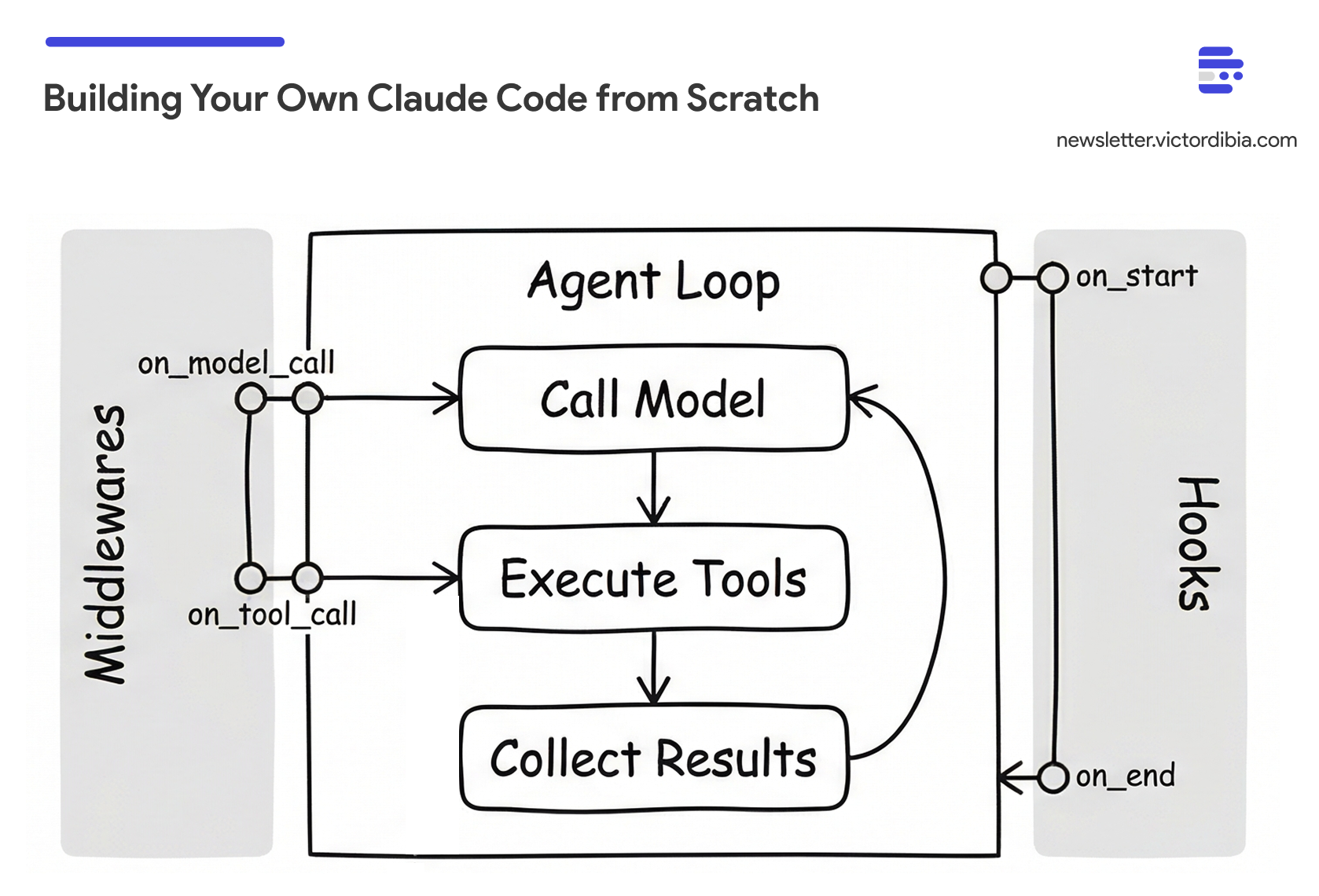
In a previous post, I walked through the basic agent execution loop - the while loop that calls a model, executes tools, and iterates. That loop is the foundation. But there’s a gap between a basic loop and agents like Claude Code, GitHub Copilot CLI, or Gemini CLI that handle complex, multi-step tasks over extended runs.
Consider what happens when you ask Claude Code to “refactor this authentication system to use JWT tokens.” It needs to find all relevant files across the codebase, read and understand the current implementation, plan the changes, edit multiple files, run tests to verify nothing broke, and iterate if tests fail. That’s 20-40 iterations. Or more. Each iteration adds tool calls and results to the context. A basic loop can’t handle this - context explodes, the agent quits early, and you have no visibility into what’s happening.
What bridges the gap? Three extensions:
Tools - Not just any tools, but the specific set that enables code exploration and modification at scale
Middlewares and hooks - Per-call interception for observability and safety, plus loop-level control for persistence
Context management - Strategies to handle the inevitable context explosion
This post walks through building an updated agent (beyond the for loop) using PicoAgents - the companion multi-agent framework built from scratch as part of the Designing Multi-Agent Systems book project.
All code below comes from PicoAgents - a working framework you can install and run, not pseudocode. Snippets are simplified; comments note which source file each comes from.
Extension 1: The Right Tools
The first piece of the puzzle is assembling the right set of tools. Reviewing what Claude Code ships with is instructive - the tools cluster into four groups:
Exploration - finding and reading code
Read- file contents with line numbers (supports images, PDFs, notebooks)Glob- fast file pattern matching (**/*.py,src/**/*.ts)Grep- content search using ripgrep with regex supportLS- list directories
Modification - changing code and running commands
Write- create or overwrite filesEdit/MultiEdit- exact string replacement (requires unique match)Bash- execute shell commands with timeout and background supportNotebookEdit- edit Jupyter notebook cells
Coordination - managing complex tasks
Task- launch sub-agents for complex tasks (Explore, general-purpose)TodoWrite- manage structured task lists with status trackingExitPlanMode- exit planning mode after creating implementation plan
Interaction - communicating with user and web
AskUserQuestion- ask structured multiple-choice questionsWebFetch/WebSearch- fetch and search web contentSkill- execute user-defined skillsMCP tools - dynamic tools from MCP servers
PicoAgents implements nearly all of these. The tool names differ (ReadFileTool, EditFileTool, BashTool, etc.) but the coverage maps one-to-one. PicoAgents also adds a ThinkTool for explicit reasoning and a SkillsTool for on-demand context loading via SKILL.md files.
Tool Implementation and Design
I covered how to implement tools (the @tool decorator, JSON Schema generation, and the tool execution pattern) in my agent execution loop post, and the broader arc of how tool calling has evolved in the arc of tool calling. PicoAgents’ tool implementations are in picoagents/tools/.
What’s worth highlighting here are the design patterns specific to coding agent tools:
Output truncation matters more than you’d think. A naive bash("ls -la") on a large directory dumps thousands of lines into context. Every token of that output gets carried forward to every subsequent LLM call. PicoAgents’ BashTool caps output and includes exit codes; ReadFileTool takes offset and limit parameters so the agent can read files in chunks.
Structured errors over stack traces. Error: File not found: config.py is actionable. A Python traceback wastes tokens and confuses the model. Every tool should return a clear, concise error message that tells the model what to do differently.
Edit uniqueness prevents wrong-location edits. The EditFileTool requires the target string to be unique in the file. If the string appears multiple times, the tool returns an error asking for more context. This is the same pattern Claude Code uses - it prevents the common failure of editing the wrong occurrence of a repeated string.
The security model is local trust. These tools are powerful - bash can execute arbitrary commands, write_file can overwrite anything. This is intentional. Meta’s Rule of Two framework captures why this works: agents should satisfy no more than two of (A) process untrusted inputs, (B) access sensitive systems, (C) change state. A local coding agent satisfies B and C, but not A - the input is from you, the trusted user.
Learning from Claude Code’s System Prompt
Tools are only half the equation. The other half is how you instruct the model to use them. Claude Code’s system prompt has been published and reveals patterns worth adopting:
Token minimization - “Responses under 4 lines unless detail requested” - saves context
Batch tool calls - “Call multiple tools in a single response” - fewer iterations
Read before edit - “NEVER edit a file you haven’t read” - prevents blind edits
Follow patterns - “Examine neighboring files before writing” - consistency
Verify deps - “Never assume libraries exist” - prevents import errors
No proactive docs - “NEVER create documentation unless requested” - stays focused
PicoAgents’ _instructions.py incorporates a good number of these patterns.
Extension 2: Middlewares and Hooks
As agents run longer, you need two kinds of control: visibility into individual operations (what tool just ran? how many tokens did that call use?) and control over the loop itself (is the task actually done? should the agent keep going?).
PicoAgents separates these into two distinct mechanisms, following the pattern I described in my middleware post:
Middlewares intercept individual tool/model calls. They fire around each operation and can log, block, or modify calls.
Hooks intercept the agent loop itself. They fire before the first LLM call or when the agent tries to stop, and can inject instructions or check completion.
Middlewares: Per-Call Interception
Middlewares wrap individual tool and model calls. PicoAgents uses a BaseMiddleware class with two override points: on_model_call (fires around each LLM request) and on_tool_call (fires around each tool execution). Override either to log, modify, or block the operation:
from picoagents._middleware import BaseMiddleware

class TokenTrackingMiddleware(BaseMiddleware):
    async def on_model_call(self, messages, tools, context, next_fn):
        result = await next_fn(messages, tools)
        print(f"Tokens: {result.usage.tokens_input} in, "
              f"{result.usage.tokens_output} out")
        return result

    async def on_tool_call(self, tool_name, parameters, context, next_fn):
        if tool_name == "bash" and "rm -rf" in parameters.get("command", ""):
            return ToolResult(success=False, result="Blocked: dangerous command")
        return await next_fn(tool_name, parameters)
The next_fn pattern chains middlewares - each one decides whether to pass through, modify, or block the call. The blocked result goes back to the model as a tool response, so it can adjust its approach.
Hooks: Loop-Level Control
Hooks operate at a different level - they fire at two points in the agent loop: before the first LLM call (start hooks) and when the agent would stop because it returned no tool calls (end hooks). They don’t see individual operations.
Start hooks run once before the first LLM call. They inject instructions:
from picoagents._hooks import BaseStartHook, BaseEndHook

class PlanningHook(BaseStartHook):
    async def on_start(self, context: LoopContext) -> str | None:
        return (
            "Before starting, break the task into steps using todo_write. "
            "Mark each step as you complete it."
        )
End hooks run when the agent tries to stop (returns no tool calls). They decide whether to let it:
class LLMCompletionCheckHook(BaseEndHook):
    def __init__(self, max_restarts=2):
        self.termination = MaxRestartsTermination(max_restarts)

    async def on_end(self, context: LoopContext) -> str | None:
        if self.termination.should_terminate(context):
            return None  # Hit restart limit, allow stop

        # Summarize what the agent actually did (tool calls, not claims)
        summary = self._build_activity_log(context.llm_messages)

        # Ask a judge model: is this complete?
        result = await context.model_client.create([
            SystemMessage("Judge task completion based on tool calls and "
                          "results, not the agent's claims. "
                          "Reply COMPLETE or INCOMPLETE."),
            UserMessage(f"Task: {context.llm_messages[1].content}\n\n"
                        f"Activity:\n{summary}"),
        ])

        if result.message.content.startswith("COMPLETE"):
            return None  # Done, allow stop

        return f"You are not done yet. Continue working."
Return a string: the agent gets that message injected and the loop continues. Return None: the agent stops. The MaxRestartsTermination safety valve prevents infinite loops - after N restarts, the hook allows the agent to stop regardless.
The two mechanisms are complementary. A middleware that blocks rm -rf fires on every tool call, but it can’t prevent early stopping. An end hook that checks completion can keep the agent going, but it can’t block a dangerous command. Together, they give agents cognitive durability - the ability to persist through long tasks instead of quitting at the first natural pause. How completion hooks interact with context management is where things get interesting.
Extension 3: Context Management
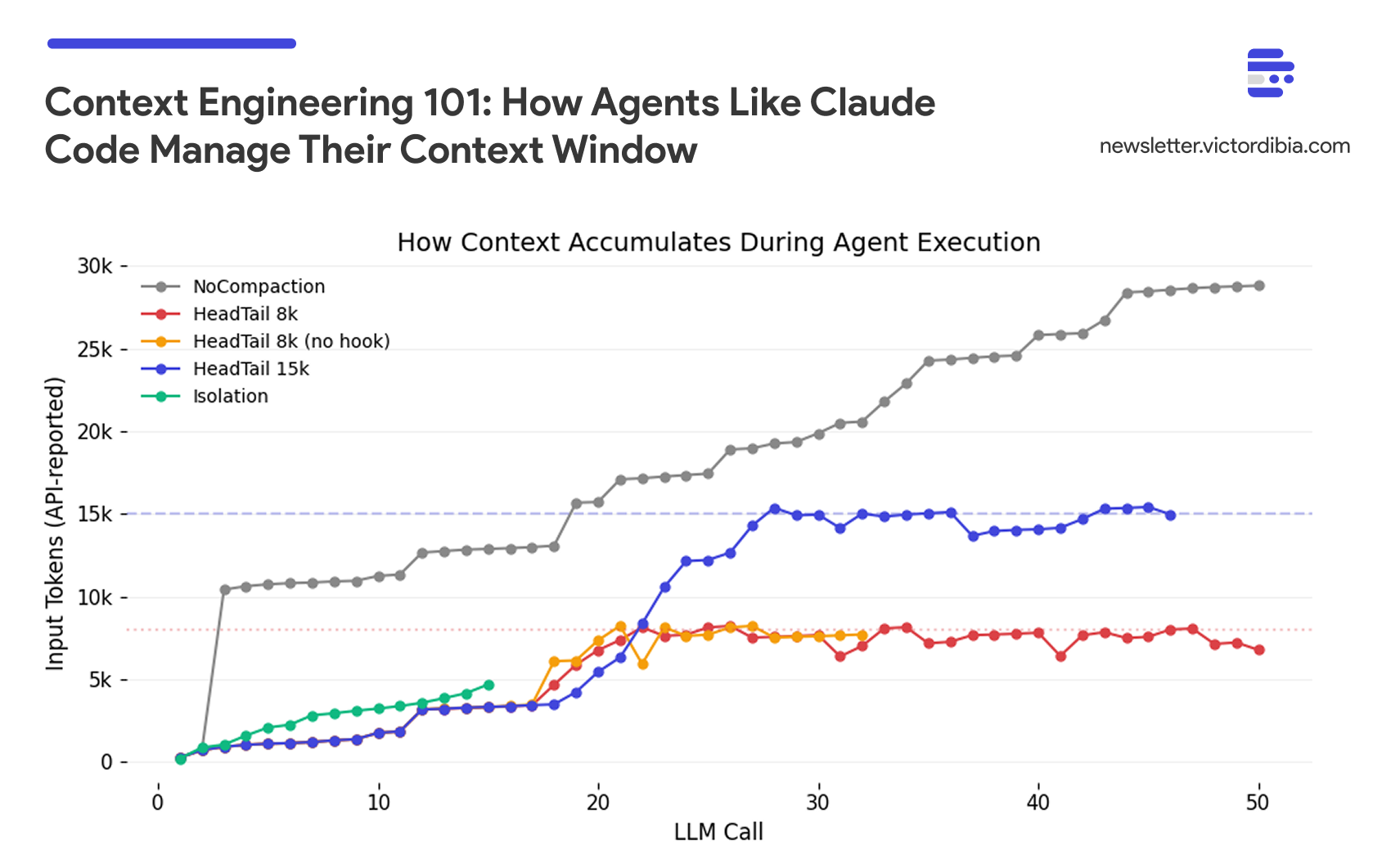
Without context management, every tool result accumulates. A 20-iteration task with file reads, grep results, and bash outputs will overflow any context window. I covered context engineering strategies in depth in a previous post - including benchmarks comparing strategies, the sawtooth pattern of healthy compaction, and the thrashing failure mode when budgets are too tight. Here I’ll focus on two things that post didn’t cover well: the pluggable strategy pattern and the critical implementation detail that most frameworks get wrong.
Compaction as a Pluggable Strategy
PicoAgents defines a CompactionStrategy protocol with a single method: compact(messages) -> messages. Any class that implements this method can be plugged into an agent. PicoAgents ships with three built-in strategies:
HeadTailCompaction- Keeps the head (system prompt, task) and tail (recent work), drops the middle. Zero extra cost. Works with any provider.SlidingWindowCompaction- Keeps the last N messages. Simpler but loses the original task context.NoCompaction- Baseline that returns messages unchanged, for benchmarking.
But these are just starting points. The protocol is the point - you can implement your own. An LLM-based summarization strategy (like what Claude Code uses via Anthropic’s Compaction API) preserves semantic meaning but costs an extra LLM call and is provider-specific. A hybrid strategy could summarize the middle while preserving head and tail verbatim. The agent doesn’t care which strategy it gets - it calls compact() and gets back messages.
One implementation detail matters: many agent frameworks apply compaction after adding new messages but use the original list for the next iteration. The compacted list doesn’t persist.
PicoAgents applies compaction before each LLM call, and the compacted list continues forward:
# From picoagents/agents/_agent.py (simplified)
while iteration < self.max_iterations:
    # CRITICAL: Apply context strategy BEFORE each call
    if self.compaction:
        llm_messages = self.compaction.compact(llm_messages)

    # The compacted list is used for both this call AND continues forward
    response = await model_client.create(llm_messages, tools=tools)

    # Add response and tool results to llm_messages
    # ... (these accumulate until next compaction)
This seems obvious, but it’s a common bug. The context strategy must be in the loop with reassignment, not applied as a side effect after it.
Context Isolation via Sub-Agents
Compaction manages context within a single agent. Isolation prevents context from accumulating in the first place by running sub-tasks in separate contexts.
PicoAgents supports this via as_tool() - any agent can be wrapped as a callable tool for another agent. The sub-agent gets its own context window, tools, and compaction strategy. It runs, does its work (potentially reading dozens of files and accumulating 50k+ tokens), and returns a summary. Only that summary enters the parent’s context.
sub_agent = Agent(
    name="code_reviewer",
    description="Reviews code in a directory",
    tools=[ReadFileTool(), ListDirectoryTool()],
    compaction=HeadTailCompaction(token_budget=50_000),
    ...
)

# The coordinator never sees the sub-agent's internal context
coordinator = Agent(
    tools=[sub_agent.as_tool()],  # Agent becomes a callable tool
    ...
)
This is the same pattern Claude Code uses with its Task tool - spawn a sub-agent for bounded work, discard its context, keep only the result. The parent’s context stays bounded regardless of how much work the sub-agents do.
For benchmarks comparing compaction and isolation strategies - including the budget sizing rule and how hooks interact with compaction - see the Context Engineering post.
Putting It Together
Here’s how PicoAgents’ Agent class wires all three extensions together. The constructor takes tools, compaction, middlewares, and hooks as separate concerns:
from picoagents import Agent, LLMCompletionCheckHook
from picoagents.compaction import HeadTailCompaction
from picoagents._hooks import PlanningHook
from picoagents._middleware import BaseMiddleware
from picoagents.llm import AzureOpenAIChatCompletionClient
from picoagents.tools import create_coding_tools, create_context_engineering_tools

model_client = AzureOpenAIChatCompletionClient(
    model="gpt-4.1-mini",
    azure_endpoint=os.environ["AZURE_OPENAI_ENDPOINT"],
)

agent = Agent(
    name="coding_agent",
    instructions="You are a senior software engineer...",
    model_client=model_client,
    tools=create_coding_tools() + create_context_engineering_tools(),
    compaction=HeadTailCompaction(token_budget=100_000, head_ratio=0.2),
    middlewares=[TokenTrackingMiddleware()],
    start_hooks=[PlanningHook()],
    end_hooks=[LLMCompletionCheckHook(max_restarts=5)],
    max_iterations=50,
)

response = await agent.run("Find all Python files that import pandas and list them")
# response.usage has token counts, LLM calls, tool calls
# response.context has the full conversation for multi-turn follow-ups
The create_coding_tools() preset includes: ReadFileTool, WriteFileTool, EditFileTool, GlobFilesTool, GrepTool, ListDirectoryTool, BashTool. Add create_context_engineering_tools() for TodoWriteTool, TodoReadTool, and SkillsTool. Wrap any agent with as_tool() for sub-agent isolation.
Multi-turn conversations pass the context forward:
r1 = await agent.run("Find the bug in auth.py")
r2 = await agent.run("Now fix it", context=r1.context)  # Continues the conversation
To dig into the implementation, here are the key source files:
_agent.py - Agent class with tool loop, compaction, and hook integration
compaction.py - HeadTail and SlidingWindow compaction strategies
_hooks.py - Completion checks, planning hooks, termination conditions
_middleware.py - BaseMiddleware for per-call interception
tools/ - Tool implementations (coding, context engineering, research)
compaction.ipynb - Benchmark comparing compaction strategies
Choosing Your Strategy
The three extensions interact. Here’s when to apply what:
Short tasks (< 5 tool calls): No compaction, hooks, or sub-agents needed.
Medium tasks (5-20 calls): Compaction at 2-3x working set. Token tracking middleware. Sub-agents optional.
Long tasks (20+ calls): Compaction + completion hook. Token tracking + tool blocking middlewares. Sub-agents for bounded subtasks.
Multi-directory operations: Compaction on each agent. Completion check on coordinator. One sub-agent per directory.
The general principle: compaction manages memory within an agent, hooks manage persistence across the loop, and sub-agents manage scope across tasks. Start simple, add complexity only when you see the failure mode it addresses (context overflow, early stopping, or unbounded growth).
Same Patterns, Different Frameworks
The three extensions are architectural patterns, not framework features - PicoAgents is just one implementation. The implementation details differ, but the architecture is the same. Here’s how each maps to other frameworks:
Tools: Every framework has tool registration. The specific tools (read, edit, glob, grep, bash) are what matter for coding agents - the registration mechanism is interchangeable.
LangGraph -
@tooldecorator, tools passed tocreate_react_agent()Microsoft Agent Framework -
@kernel_functiondecorator orai_functionregistrationGoogle ADK -
FunctionToolwrapper, tools passed toAgent()Claude Agent SDK - Tools defined in agent config
Middlewares and hooks: The naming varies, but the concept is universal - intercept operations at call level or loop level.
PicoAgents - Per-call: BaseMiddleware (on_tool_call, on_model_call). Loop-level: BaseStartHook, BaseEndHook
Deep Agents - Per-call: AgentMiddleware with
wrap_model_call(). Loop-level: state-based viaIsLastStepAgent Framework - Per-call: middleware classes (decorator or class-based). Loop-level: event handlers
Google ADK - Per-call: before_tool_callback, after_tool_callback. Loop-level:
before_agent_callback,after_agent_callbackClaude Agent SDK - Per-call: PreToolUse, PostToolUse hooks. Loop-level: session-level hooks
Compaction: The strategies differ but the need is universal. Deep Agents uses SummarizationMiddleware that triggers at 85% context fill, summarizes old messages with a smaller model, and offloads full history to a backend file. LangGraph’s core provides RemoveMessage primitives and custom state reducers - you build your own trimming logic. PicoAgents uses HeadTail trimming with no extra LLM calls. Different trade-offs, same architectural slot.
The PicoAgents implementation is one reference - adapt the patterns to whatever you’re using.
Key Takeaways
Tools matter, but not quantity - A focused set covering exploration (read, glob, grep), modification (write, edit, bash), and coordination (task, todo_write) handles most coding tasks.
Middlewares and hooks solve different problems - Middlewares intercept individual calls (observability, safety). Hooks control the loop itself (prevent early stopping, inject planning etc). You need both for long-running agents.
Right-size your compaction budget - Compaction cuts total tokens (56-70% in benchmarks), but too-tight budgets backfire. At 8k budget, agents scored 4.0/10 vs 6.0/10 without compaction - they lost memory of recent work and wasted 55% of reads re-reading files they’d already seen. A healthy budget produces a sawtooth context curve (grow, trim, grow). A flat line at the budget means thrashing. If your duplicate read ratio exceeds 15%, increase the budget. Size it at 2-3x the agent’s typical working set.
Hooks and compaction interact - Completion hooks can amplify thrashing with tight budgets. Right-size the budget first, then add hooks.
These patterns are universal - Deep Agents (built on LangGraph) implements all three:
SummarizationMiddlewarefor compaction,AgentMiddlewarefor per-call interception, andSubAgentMiddlewarefor context isolation - with the same coding tools (read, edit, glob, grep, bash). LangGraph’s core providesRemoveMessagefor trimming andIsLastStepfor loop control. The patterns are the same regardless of framework.
The full PicoAgents implementation is available in the companion repo for Designing Multi-Agent Systems. The book covers these patterns in depth, including evaluation frameworks and the 10 common failure modes in agent systems.
Up next: The patterns above are sufficient for building a strong initial agent. But production agents extend these ideas in ways that are hard to anticipate until you’ve seen them. On March 31, 2026, the full Claude Code source was inadvertently published via its npm registry - giving us a rare look at a production agent harness used by hundreds of thousands of developers. In the next post, I tear down that source code and show exactly how the same three extensions - tools, hooks, and compaction - evolve when they need to handle 50+ iteration sessions, recover from API failures, and manage context across sub-agents.
Related posts:
The Agent Execution Loop - The foundation this post builds on
Agent Middleware - Control and observability patterns
Context Engineering 101 - Full benchmark comparing compaction strategies
Implementing Claude Code Skills from Scratch - On-demand context loading
The Arc of Tool Calling - From code to tools and back
References
Anthropic. “Claude Code.”
Anthropic. “Compaction API Documentation.” 2026.
Anthropic. “Effective Context Engineering for AI Agents.”
Thariq. “Lessons from Building Claude Code: Prompt Caching Is Everything.” Feb 2026.
Rigby. “What Actually Happens When You Run /compact in Claude Code.” 2026.
Anthropic. “Claude Code System Prompt.” Published system prompt.
Piebald-AI. “Claude Code System Prompts.” Extracted prompts from Claude Code releases.
Meta AI. “Agents Rule of Two: A Practical Approach to AI Agent Security.”
Liu et al. “Lost in the Middle: How Language Models Use Long Contexts.” 2023.