

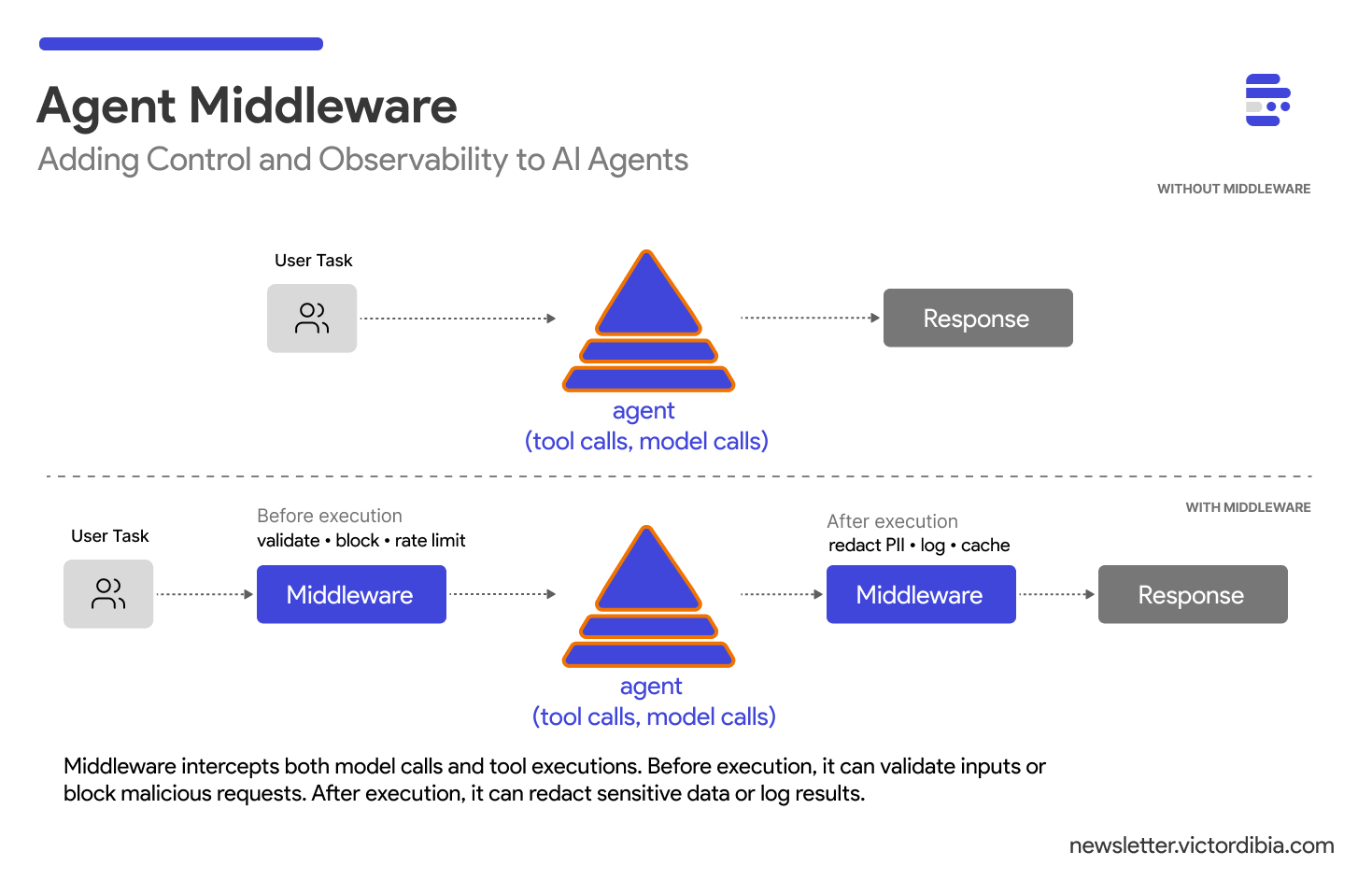
In a previous post on the agent execution loop, I showed how agents work: a while loop that calls a model, executes tools, and iterates until done. That loop is the engine or harness. But engines need control routines that govern behaviour.
When you deploy an agent to production, new questions emerge:
How do I log every model call and tool execution?
How do I block malicious prompts before they reach the LLM?
How do I rate limit users to control costs?
How do I redact PII from outputs before they reach users or broader telemetry systems?
How do I create audit trails for compliance?
One way to do this is middleware - routines that intercept agent operations at key points in the execution loop (e.g., before/after a model call, before/after tool calls etc). If you’ve built web applications with Express, Django, or FastAPI, you know this pattern. And it works just as well for agents.

Note: This post is adapted from my book Designing Multi-Agent Systems, where Chapter 4 walks you through building a complete Agent class from scratch. The agent class is part of PicoAgents : a minimal, hackable multi-agent framework which the reader gets to build across the sections of the book. While we will be using the picoagents sample in this post, the same patterns apply across frameworks like LangChain, Microsoft Agent Framework, and others (see examples at the end of the post).
Digital PDF: buy.multiagentbook.com
Print on Amazon: amazon.com/dp/B0G2BCQQJY
Middleware source: picoagents/_middleware.py
What is Agent Middleware?
Middleware intercepts agent operations before and after they execute. When an agent prepares to call the LLM or execute a tool, that operation first passes through a middleware chain. Each middleware can:
Inspect the operation (inputs, context, metadata)
Modify inputs or outputs
Block the operation entirely by raising an exception
Log what happened for observability
Here’s the mental model:
User Task
    ↓
[Middleware Chain]
    ↓
Model Call → [Middleware] → LLM API → [Middleware] → Response
    ↓
Tool Call → [Middleware] → Execute → [Middleware] → Result
    ↓
Final Response
Every model call and tool execution routes through the middleware chain. This gives you a single control plane for security, observability, and policy enforcement.
While this example focuses on model and tool call operations, you can also implement middleware for other operations e.g., calls to fetch or write to memory.
The BaseMiddleware Interface
To standardize how middleware works, we define a common interface with three hooks. In PicoAgents middleware interface, we use async generators (yield) for the hooks rather than return values - this enables streaming support and event emission for observability:
from abc import ABC, abstractmethod
from collections.abc import AsyncGenerator
from typing import Any, Union

class BaseMiddleware(ABC):
    “”“Abstract base class for middleware.”“”

    @abstractmethod
    async def process_request(
        self, context: MiddlewareContext
    ) -> AsyncGenerator[Union[MiddlewareContext, “AgentEvent”], None]:
        “”“Process before the operation executes.”“”
        yield context

    @abstractmethod
    async def process_response(
        self, context: MiddlewareContext, result: Any
    ) -> AsyncGenerator[Union[Any, “AgentEvent”], None]:
        “”“Process after the operation completes successfully.”“”
        yield result

    @abstractmethod
    async def process_error(
        self, context: MiddlewareContext, error: Exception
    ) -> AsyncGenerator[Union[Any, “AgentEvent”], None]:
        “”“Handle errors from the operation.”“”
        raise error
process_request() runs before any model call or tool execution. This is where you validate inputs, start timers, or block suspicious requests. Yield the context to continue, or raise to abort.
process_response() runs after successful operations. Use it to filter outputs, cache results, or log completion times. Yield the (possibly modified) result.
process_error() handles failures. Log errors, provide fallbacks, or implement retry logic. Yield a recovery value, or re-raise to propagate.
The async generator pattern (yield instead of return) enables middleware to emit events for observability and supports streaming responses - both critical for production agents.
Example 1: Logging Middleware
The simplest and most useful middleware: log everything.
import time

class LoggingMiddleware(BaseMiddleware):
    “”“Log all agent operations with timing.”“”

    async def process_request(self, context: MiddlewareContext):
        print(f”[{context.agent_name}] Starting {context.operation}”)
        context.metadata[”start_time”] = time.time()
        yield context

    async def process_response(self, context: MiddlewareContext, result: Any):
        duration = time.time() - context.metadata.get(”start_time”, 0)
        print(f”[{context.agent_name}] {context.operation} completed in {duration:.2f}s”)
        yield result

    async def process_error(self, context: MiddlewareContext, error: Exception):
        print(f”[{context.agent_name}] {context.operation} failed: {error}”)
        raise error
Pass it to your agent:
agent = Agent(
    name=”assistant”,
    model_client=OpenAIChatCompletionClient(model=”gpt-4.1-mini”),
    instructions=”You are a helpful assistant.”,
    middlewares=[LoggingMiddleware()]
)

response = await agent.run(”What’s 2+2?”)
Output:
[assistant] Starting model_call
[assistant] model_call completed in 0.82s
Every operation is now visible. When debugging why an agent made a specific decision or measuring latency, this is your first line of defense.
Note: What is not shown above is how the middleware chain is “wired” into the agent execution loop. See the implementation of the agent class to review how model calls and tool calls are passed through a chain of middleware associated with the agent.
Example 2: Guardrail Middleware
Agents are vulnerable to prompt injection - malicious inputs that hijack the model’s behavior. A guardrail middleware can block dangerous patterns before they reach the LLM:
import re

class GuardrailMiddleware(BaseMiddleware):
    “”“Block malicious input before it reaches the model.”“”

    def __init__(self, blocked_patterns: list[str] = None):
        # Basic patterns for demonstration
        self.blocked_patterns = [re.compile(p) for p in (blocked_patterns or [
            r”ignore.*previous.*instructions”,
            r”system.*prompt.*override”,
            r”<script.*?>.*?</script>”,
        ])]

    async def process_request(self, context: MiddlewareContext):
        if context.operation == “model_call”:
            for message in context.data:
                if hasattr(message, “content”):
                    for pattern in self.blocked_patterns:
                        if pattern.search(message.content):
                            raise ValueError(f”Blocked pattern: {pattern.pattern}”)
        yield context

    async def process_response(self, context, result):
        yield result

    async def process_error(self, context, error):
        raise error
When the middleware detects dangerous patterns, it raises an exception immediately. The malicious input never reaches the model. No expensive API call is made. No problematic content enters your logs.
Important: Regex-based filtering is a first line of defense, not a complete solution. Adversarial users can easily rephrase prompts to bypass pattern matching (”disregard prior directives” instead of “ignore previous instructions”). For production systems, consider dedicated guardrail models like Llama Guard, Azure AI Content Safety, or similar classification-based approaches that understand semantic meaning rather than just matching strings.
Example 3: Rate Limiting Middleware
LLM API calls are expensive. Without rate limiting, a single abusive user can blow through your budget. Here’s a simple rate limiter middleware!
import asyncio
import time

class RateLimitMiddleware(BaseMiddleware):
    “”“Limit API calls per minute.”“”

    def __init__(self, max_calls_per_minute: int = 60):
        self.max_calls = max_calls_per_minute
        # NOTE: In production, use Redis or similar for distributed state.
        # In-memory state won’t work across multiple containers or serverless functions.
        self.call_times: list[float] = []

    async def process_request(self, context: MiddlewareContext):
        now = time.time()

        # Remove calls outside the 60-second window
        self.call_times = [t for t in self.call_times if now - t < 60]

        # If at limit, wait until oldest call expires
        if len(self.call_times) >= self.max_calls:
            oldest_call = self.call_times[0]
            wait_time = 60 - (now - oldest_call)
            if wait_time > 0:
                await asyncio.sleep(wait_time)
                now = time.time()

        self.call_times.append(now)
        yield context

    async def process_response(self, context, result):
        yield result

    async def process_error(self, context, error):
        raise error
Usage:
agent = Agent(
    name=”limited_assistant”,
    model_client=OpenAIChatCompletionClient(model=”gpt-4.1-mini”),
    instructions=”You are a helpful assistant.”,
    middlewares=[RateLimitMiddleware(max_calls_per_minute=10)]
)
Now your agent can’t be abused into making unlimited API calls. The middleware throttles requests to stay within budget.
Example 4: PII Redaction Middleware
Consider a scenario where a customer service agent handles sensitive data. A PII redaction middleware can detect and sanitize both inputs and outputs:
import re

class PIIRedactionMiddleware(BaseMiddleware):
    “”“Redact personally identifiable information from inputs and outputs.”“”

    def __init__(self):
        self.patterns = {
            r”\b\d{3}-\d{2}-\d{4}\b”: “[SSN-REDACTED]”,
            r”\b[A-Za-z0-9._%+-]+@[A-Za-z0-9.-]+\.[A-Z|a-z]{2,}\b”: “[EMAIL-REDACTED]”,
            r”\b\d{3}[-.]?\d{3}[-.]?\d{4}\b”: “[PHONE-REDACTED]”,
            r”\b\d{4}[\s-]?\d{4}[\s-]?\d{4}[\s-]?\d{4}\b”: “[CC-REDACTED]”,
        }

    def _redact(self, text: str) -> str:
        for pattern, replacement in self.patterns.items():
            text = re.sub(pattern, replacement, text)
        return text

    async def process_request(self, context: MiddlewareContext):
        # Redact PII from inputs before they reach the model
        if context.operation == “model_call” and isinstance(context.data, list):
            for msg in context.data:
                if hasattr(msg, “content”):
                    msg.content = self._redact(msg.content)
        yield context

    async def process_response(self, context: MiddlewareContext, result: Any):
        # Redact PII from outputs before they reach users
        if hasattr(result, “message”) and hasattr(result.message, “content”):
            result.message.content = self._redact(result.message.content)
        yield result

    async def process_error(self, context, error):
        raise error
Now sensitive data never leaves your system unprotected:
Input: “Customer called from 555-123-4567, email john@example.com”

Output: “Customer called from [PHONE-REDACTED], email [EMAIL-REDACTED]”
Note: For streaming responses, PII redaction requires buffering chunks until you have enough context to detect patterns - you can’t redact a partial phone number mid-stream. In PicoAgents, you can handle this via the async generator pattern, allowing middleware to buffer and transform chunks before yielding them.
How Agents Use Middleware
Internally, agents route their core operations through the middleware chain:
class Agent:
    async def run(self, task: str):
        # ... prepare messages ...

        # Model call wrapped with middleware
        completion_result = await self.middleware_chain.execute(
            operation=”model_call”,
            agent_name=self.name,
            agent_context=self.context,
            data=llm_messages,
            func=lambda msgs: self.model_client.create(msgs, tools=tools)
        )

        # Tool execution wrapped with middleware
        for tool_call in completion_result.tool_calls:
            tool_result = await self.middleware_chain.execute(
                operation=”tool_call”,
                agent_name=self.name,
                agent_context=self.context,
                data=tool_call,
                func=lambda tc: self._execute_tool(tc)
            )
The middleware_chain.execute() method calls each middleware in sequence. Each middleware receives the operation details and can decide whether to proceed, modify the data, or block entirely.
Composing Multiple Middleware
Middleware composes naturally (depending on the implementation). Order matters - middleware executes in the order you provide:
agent = Agent(
    name=”production_agent”,
    model_client=OpenAIChatCompletionClient(model=”gpt-4.1-mini”),
    instructions=”You are a helpful assistant.”,
    middlewares=[
        LoggingMiddleware(),         # Log everything first
        GuardrailMiddleware(),       # Block malicious inputs
        RateLimitMiddleware(60),     # Enforce rate limits
        PIIRedactionMiddleware(),    # Sanitize inputs/outputs
    ]
)
Request flow: Logging → Guardrail → Rate Limit → (execute) → PII Redaction → Logging
If guardrail middleware blocks a request, rate limiting and execution never happen. This short-circuit behavior is intentional—you don’t want to waste resources on blocked operations.
PicoAgents includes ready-to-use middleware for common patterns that you can learn from: LoggingMiddleware, RateLimitMiddleware, PIIRedactionMiddleware, GuardrailMiddleware, and MetricsMiddleware. Use them directly or as starting points for custom implementations.
Same Pattern, Different Frameworks
The middleware pattern isn’t unique to PicoAgents—it’s how production agent frameworks handle control and observability. The syntax differs, but the core architecture is identical: intercept operations, optionally modify or block, then proceed.
Microsoft Agent Framework provides three middleware interfaces: AgentMiddleware (wraps agent runs), FunctionMiddleware (wraps tool calls), and ChatMiddleware (wraps LLM requests). You can define them as classes, functions, or use decorators:
from agent_framework import AgentMiddleware, AgentRunContext

class SecurityMiddleware(AgentMiddleware):
    async def process(self, context: AgentRunContext, next):
        if is_malicious(context.messages):
            context.result = AgentRunResponse(messages=[...])
            context.terminate = True  # Stop execution
            return
        await next(context)
