

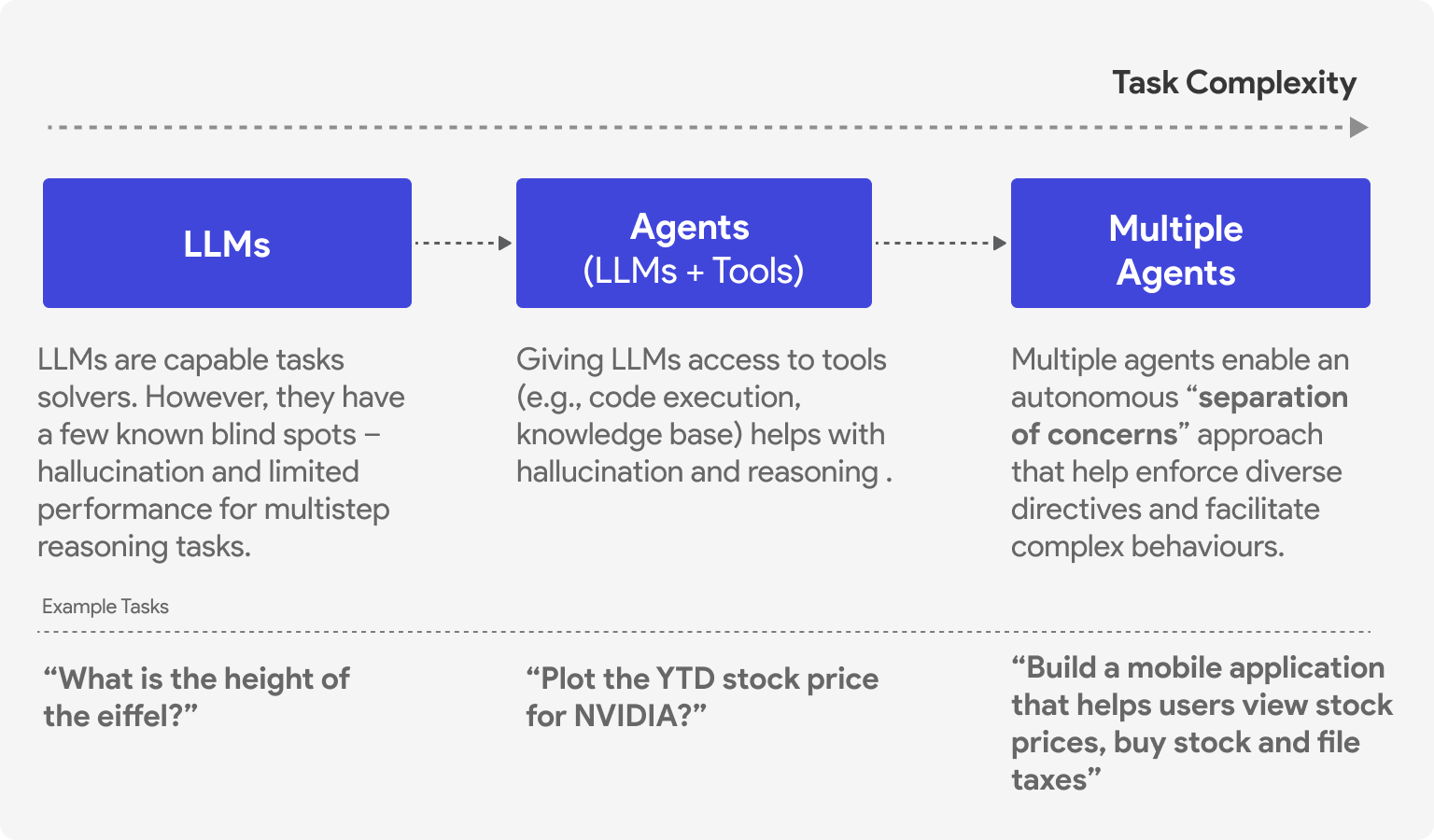
2025 has been dubbed the year of agentic AI. Tools like Google Gemini CLI, Claude Code, GitHub Copilot agent mode, and Cursor are all examples of agents—autonomous entities that can take an open-ended task, plan, take action, reflect on the results, and loop until the task is done. And they’re creating real value.
But how do agents actually work? How can you build one?
In this post, I’ll walk through the core of how agents function: the agent execution loop that powers these complex behaviors.
Note: This post is adapted from my book Designing Multi-Agent Systems, where Part II (Chapters 4-6) guides you through building a complete agent framework from scratch.
Digital PDF: buy.multiagentbook.com
Print on Amazon: amazon.com/dp/B0G2BCQQJY

What is an Agent?
An agent is an entity that can reason, act, communicate, and adapt to solve problems.
Consider two questions you might ask a generative AI model like GPT5 from OpenAI or Claude from Anthropic:
“What is the capital of France?”
“What is the stock price of NVIDIA today?”
The first question can be answered by a model directly (it likely has seen instances of this specific fact/knowledge and this is now encoded in its model weights). The second cannot - the model will hallucinate a plausible-sounding but incorrect answer because it doesn’t have access to real-time data.
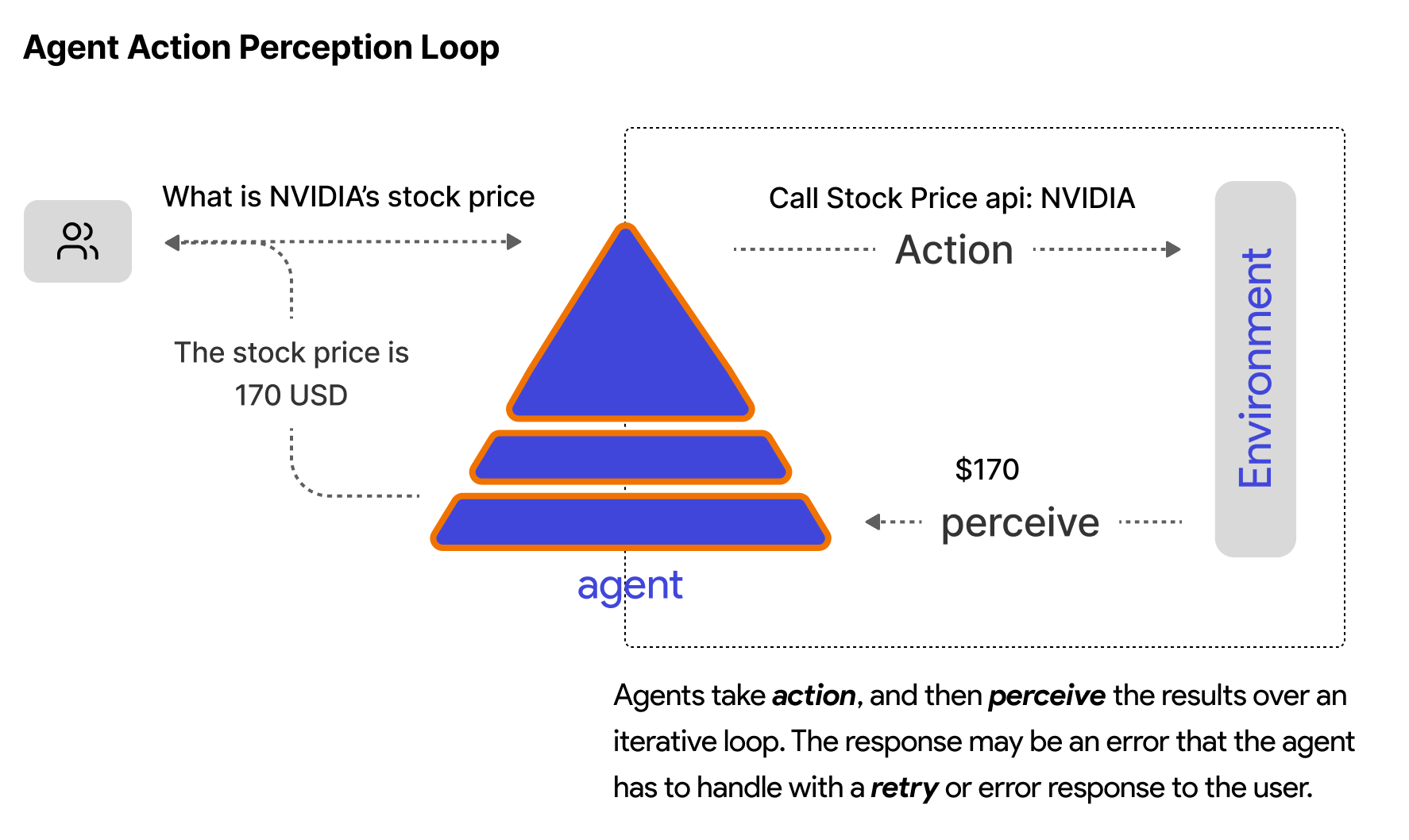
An agent setup solves this by recognizing it needs current data, calling a financial API, and returning the actual price. This requires action, not just text generation.
Agent Components
In simple terms, an agent has three core components:
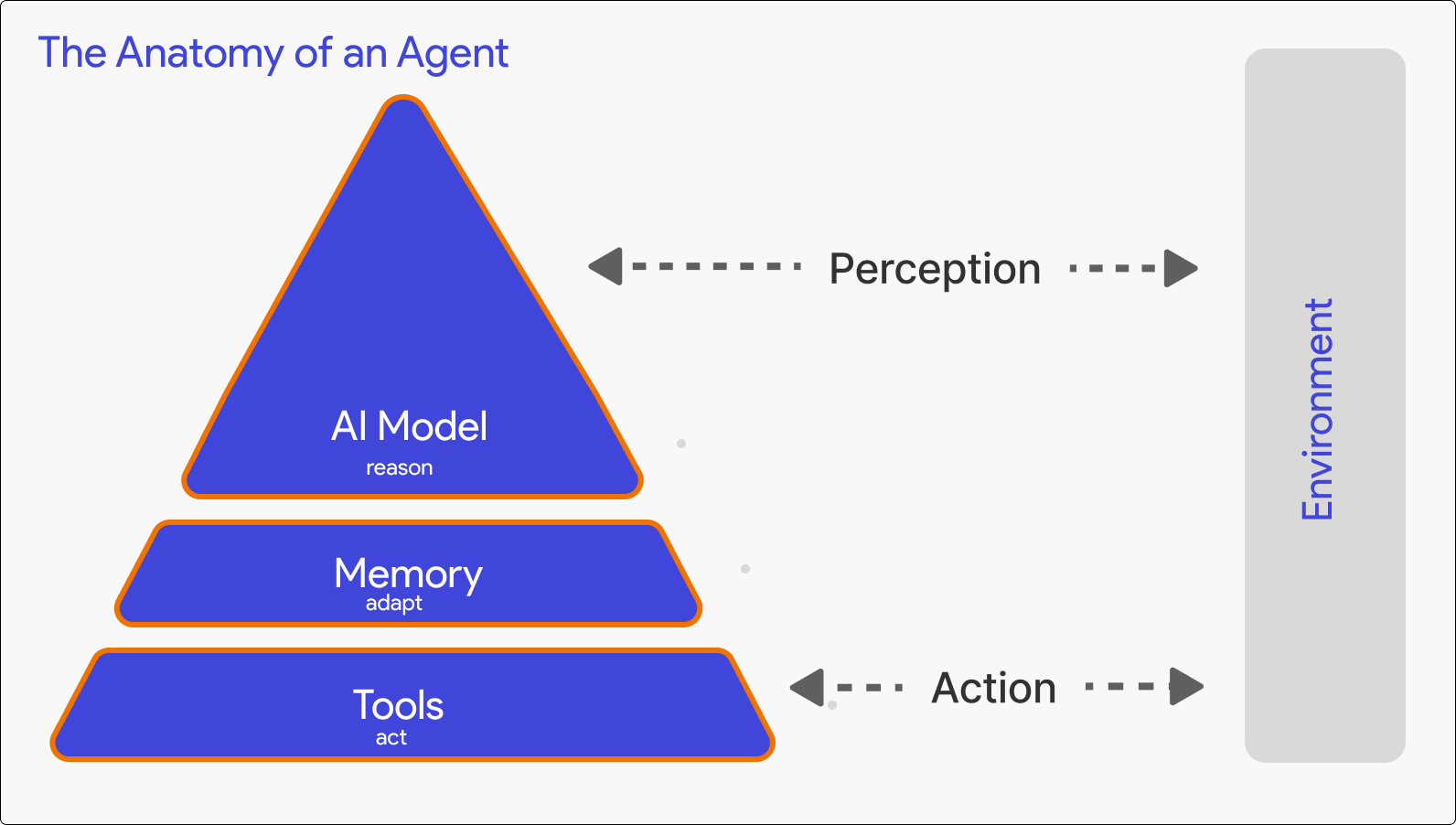
Model: The reasoning engine (typically an LLM like GPT-5) that processes context and decides what to do
Tools: Functions the agent can call to take action - APIs, databases, code execution, web search
Memory: Short-term (conversation history) and long-term (persistent storage across sessions)
Calling an LLM
Before building an agent, you need to understand how to call a generative AI language model. Here’s the basic pattern using the OpenAI API:
from openai import AsyncOpenAI

client = AsyncOpenAI(api_key=”your-api-key”)

response = await client.chat.completions.create(
    model=”gpt-5”,
    messages=[
        {”role”: “system”, “content”: “You are a helpful assistant.”},
        {”role”: “user”, “content”: “What is 2 + 2?”}
    ]
)

print(response.choices[0].message.content)
# Output: “4”
The API takes a list of messages (system instructions, user input, previous assistant responses) and returns a completion. This is a single request-response cycle.
To enable the use of tools (tool calling), you also pass tool definitions:
response = await client.chat.completions.create(
    model=”gpt-5”,
    messages=messages,
    tools=[{
        “type”: “function”,
        “function”: {
            “name”: “get_stock_price”,
            “description”: “Get current stock price for a symbol”,
            “parameters”: {
                “type”: “object”,
                “properties”: {
                    “symbol”: {”type”: “string”, “description”: “Stock symbol like NVDA”}
                },
                “required”: [”symbol”]
            }
        }
    }]
)
When the model decides it needs to use a tool, instead of returning text content, it returns a tool_calls array with the function name and arguments.
The Agent Execution Loop
Here’s the core pattern that every agent follows:
1. Prepare Context  →  Combine task + instructions + memory + history
2. Call Model       →  Send context to LLM, get response
3. Handle Response  →  If text, we’re done. If tool calls, execute them.
4. Iterate          →  Add tool results to context, go back to step 2
5. Return           →  Final response ready
In code:
async def run(task: str):
    # 1. Prepare context
    messages = [
        {”role”: “system”, “content”: self.instructions},
        {”role”: “user”, “content”: task}
    ]

    while True:
        # 2. Call model
        response = await self.client.chat.completions.create(
            model=”gpt-5”,
            messages=messages,
            tools=self.tool_schemas
        )

        assistant_message = response.choices[0].message
        messages.append(assistant_message)

        # 3. Handle response
        if not assistant_message.tool_calls:
            # No tool calls - we’re done
            return assistant_message.content

        # 4. Execute tools and iterate
        for tool_call in assistant_message.tool_calls:
            result = await self.execute_tool(
                tool_call.function.name,
                json.loads(tool_call.function.arguments)
            )
            messages.append({
                “role”: “tool”,
                “tool_call_id”: tool_call.id,
                “content”: result
            })

        # Loop continues - model will process tool results
The key insight: an agent takes multiple steps (model call → tool execution → model call) within a single run. The loop continues until the model returns a text response instead of tool calls. In some cases we might need additional logic to guide program control flow (e.g., termination conditions such as a maximum number of turns) to avoid edge cases like infinite loops with cost implications.
Tool Execution
When the model returns a tool call, you need to actually execute it:
async def execute_tool(self, name: str, arguments: dict) -> str:
    tool = self.tools[name]
    try:
        result = await tool(**arguments)
        return str(result)
    except Exception as e:
        return f”Error: {e}”
The result gets added back to the message history as a tool message, and the loop continues. The model sees what the tool returned and can either call more tools or generate a final response.
A Complete Example
Putting it together:
class Agent:
    def __init__(self, instructions: str, tools: list):
        self.client = AsyncOpenAI()
        self.instructions = instructions
        self.tools = {t.__name__: t for t in tools}
        self.tool_schemas = [self._make_schema(t) for t in tools]

    async def run(self, task: str) -> str:
        messages = [
            {”role”: “system”, “content”: self.instructions},
            {”role”: “user”, “content”: task}
        ]

        while True:
            response = await self.client.chat.completions.create(
                model=”gpt-5”,
                messages=messages,
                tools=self.tool_schemas
            )

            msg = response.choices[0].message
            messages.append(msg)

            if not msg.tool_calls:
                return msg.content

            for tc in msg.tool_calls:
                result = await self.execute_tool(
                    tc.function.name,
                    json.loads(tc.function.arguments)
                )
                messages.append({
                    “role”: “tool”,
                    “tool_call_id”: tc.id,
                    “content”: result
                })

# Usage
async def get_stock_price(symbol: str) -> str:
    # In reality, call an API here
    return f”{symbol}: $142.50”

agent = Agent(
    instructions=”You help users get stock information.”,
    tools=[get_stock_price]
)

result = await agent.run(”What’s NVIDIA trading at?”)
print(result)
# “NVIDIA (NVDA) is currently trading at $142.50.”
The agent:
Receives “What’s NVIDIA trading at?”
Calls the model, which decides to use
get_stock_priceExecutes
get_stock_price(”NVDA”)→ returns “$142.50”Adds the result to messages, calls the model again
Model generates a natural language response incorporating the data
Same Pattern, Different Frameworks
The execution loop we built is the same pattern used by production agent frameworks. The syntax differs, but the core architecture is identical: define tools, create an agent with instructions, run it on a task. The code snippets below show how each of these ideas are implemented in frameworks like Microsoft Agent Framework, Google ADK, and LangGraph.
Further Reading: The GitHub repo for the book shows how the same concepts (agents, workflows, orchestrators) are implemented across each of these frameworks: github.com/victordibia/designing-multiagent-systems/examples/frameworks
Microsoft Agent Framework:
from agent_framework import ai_function
from agent_framework.azure import AzureOpenAIChatClient

@ai_function
def get_weather(location: str) -> str:
    “”“Get current weather for a given location.”“”
    return f”The weather in {location} is sunny, 75°F”

client = AzureOpenAIChatClient(deployment_name=”gpt-4.1-mini”)
agent = client.create_agent(
    name=”assistant”,
    instructions=”You are a helpful assistant.”,
    tools=[get_weather],
)

result = await agent.run(”What’s the weather in Paris?”)
Google ADK:
from google.adk import Agent

def get_weather(location: str) -> str:
    “”“Get current weather for a given location.”“”
    return f”The weather in {location} is sunny, 75°F”

agent = Agent(
    name=”assistant”,
    model=”gemini-flash-latest”,
    instruction=”You are a helpful assistant.”,
    tools=[get_weather],
)

# Run via InMemoryRunner
LangGraph:
from langchain_core.tools import tool
from langgraph.prebuilt import create_react_agent

@tool
def get_weather(location: str) -> str:
    “”“Get current weather for a given location.”“”
    return f”The weather in {location} is sunny, 75°F”

agent = create_react_agent(
    model=llm,
    tools=[get_weather],
)

result = agent.invoke({”messages”: [(”user”, “What’s the weather in Paris?”)]})
All three frameworks: define a function, wrap it as a tool, pass it to an agent, call run. The execution loop underneath handles the model calls, tool execution, and iteration.
What’s Missing
This basic loop works, but production agents need more:
Streaming: Long tasks need progress updates, not just a final response
Memory: Persisting context across sessions
Middleware: Logging, rate limiting, safety checks
Error handling: Retries, graceful degradation
Context management: Summarizing/compacting as context grows
Orchestrating multiple agents: Deterministic workflows and autonomous orchestration patterns (handoff, magentic one etc)
End-user interfaces: Integrating agents into web applications
Complete Use Cases: Building a full coding agent with file system access, code execution, and iterative debugging
These are covered in depth in my book Designing Multi-Agent Systems, which builds a complete agent framework (picoagents) from scratch with all of these features and two complete use cases.