

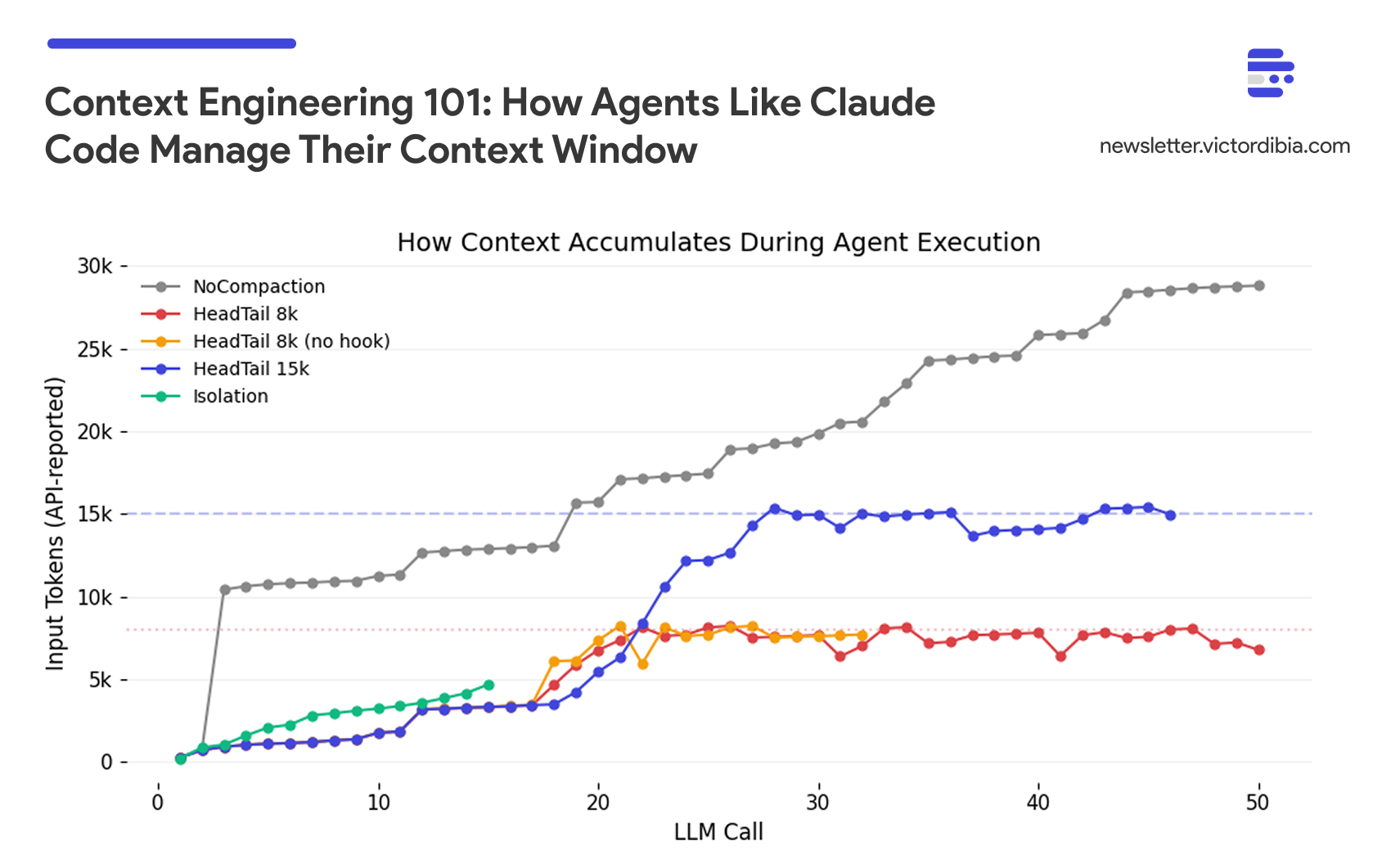
Your agent completed the task. It read 12 files, traced 3 call stacks, made 15 LLM calls, and eventually found the bug. But it also burned through 120,000 tokens to get there - roughly $1.80 on a frontier model. Run that 50 times a day across a team, and you’re looking at $2,700/month on a single agent workflow.
Most benchmarks for general-purpose agents like Claude Code and GitHub Copilot focus on task completion - did it get the job done? But in practice, how it got the job done matters just as much. The agent that reads every file in the directory when it only needed three. The agent that compacts its context, drops critical information, then re-reads the same files. The agent that carries 50,000 tokens of stale tool results into every LLM call because nothing told it to forget. These agents might succeed, but they succeed expensively - and for indie developers watching their API bill, or businesses looking to run agents at scale, context management can reduce token costs significantly, though often with quality tradeoffs that need to be understood.
Context in agents is cumulative - every message, tool result, and model response from previous steps gets carried forward into each new LLM call. As underlying models improve, agents can work on longer-horizon tasks (METR benchmarks show frontier models completing tasks equivalent to ~70 hours of human work at 80% reliability, with task complexity doubling roughly every 7 months). But longer tasks mean more accumulated context, and that creates three problems: the context window fills up and requests get rejected, token costs scale with context size, and model performance degrades as context grows (Liu et al., 2023).
Context engineering is the discipline of managing what goes into the context window. While we see the occasional “Claude is compacting” message, or the post on how note taking or even skills can help with context, the exact details on how to implement these strategies or how they impact performance are often vague. In this post, I break down the core strategies for context engineering, how to implement them, and their tradeoffs based on a benchmark I ran across five agent configurations.
TLDR; this post covers:
The problem of context explosion in multi-step agent tasks
Three core strategies for context engineering: compaction, isolation, and agentic memory
A benchmark comparing these strategies on a code review task, showing the tradeoffs between token cost
Key takeaways for when and how to apply context engineering in your agents
Note: For low complexity tasks, context engineering is less critical. Premature optimization can also hurt performance.
This post is adapted from my book Designing Multi-Agent Systems, where I cover context engineering patterns in Chapter 4 alongside agent architecture, memory systems, and multi-agent coordination.
More Context ≠ Good Context
To understand why context engineering matters, the critical first step is to build up the the right intuition for how context grows during agent execution. You can do this via context inspection.
Importantly, recall the agentic loop - agents address tasks by making LLM calls, interpreting the response, calling tools, and repeating. By default, all previous messages and tool results get appended to the context window for every new LLM call.
For example, here’s what happens to a naive agent running a multi-step research task. The agent appends every message and tool result to its context:
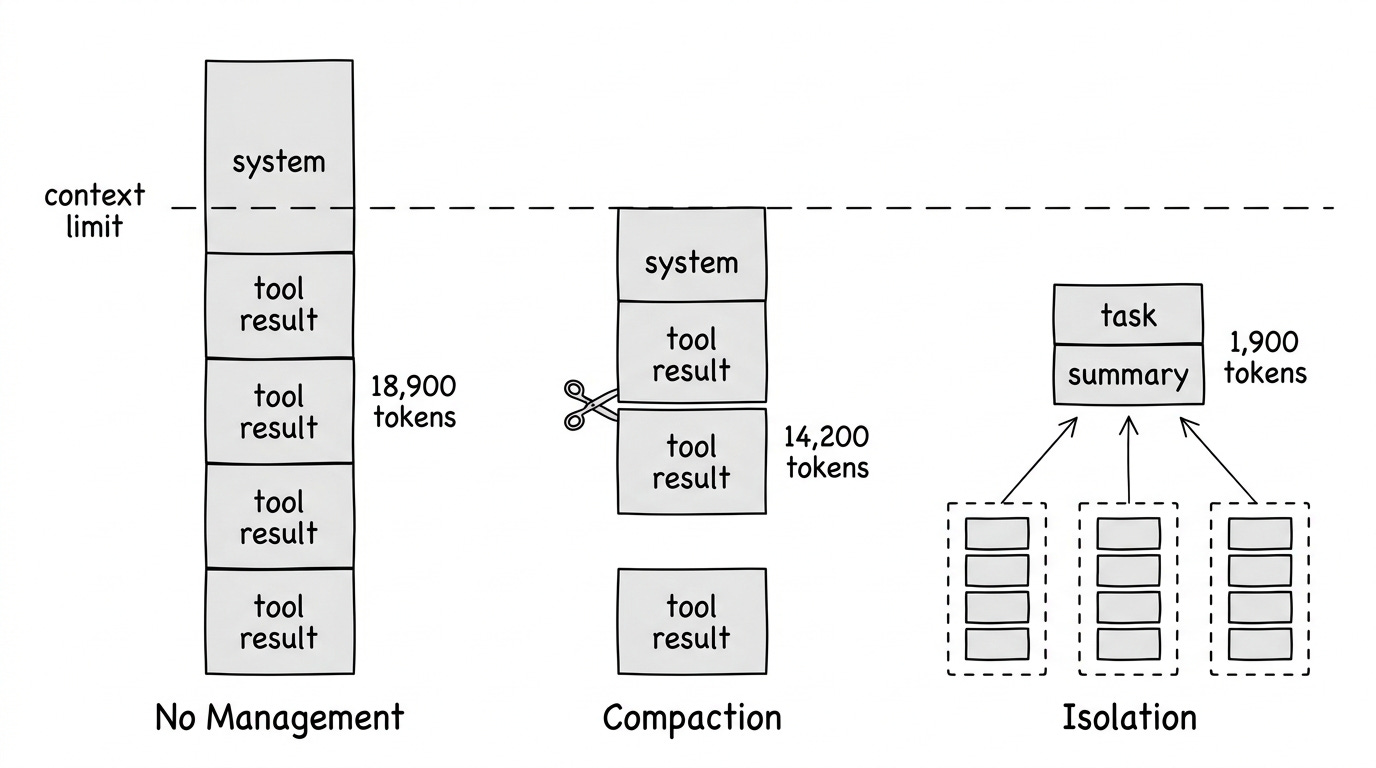
Iteration 1:    888 tokens  (system + user message)
Iteration 2:  3,400 tokens  (+ list_directory result)
Iteration 3:  8,900 tokens  (+ read_file: context.py)
Iteration 4: 14,200 tokens  (+ read_file: compaction.py)
Iteration 5: 18,900 tokens  (+ grep + read_file: _agent.py)
Token growth from a PicoAgents benchmark run (debug_investigation task, gpt model, no compaction). Each iteration adds tool results to the message history.
Interesting, the problem isn’t just the hard limit on what fits in the context window (most LLMs now support very large windows). Rather, research shows LLMs struggle with large contexts even when they technically fit:
Lost in the middle: Information in the middle of long contexts gets less attention than information at the beginning or end (Liu et al., 2023)
Performance degradation: Accuracy can drop significantly based on how information is positioned, not just whether it fits
Working memory: The context window functions as the agent’s working memory. But unlike RAM, adding more data can actively degrade retrieval of existing data. Context engineering curates what stays in that window
More context doesn’t always mean better results.
What Is Context Engineering?
Context engineering is a set of techniques for managing what goes into the context window, as the agent runs. It answers four key questions:
What to include - Selecting relevant information
What to exclude - Trimming noise and redundancy
How to represent it - Compressing information efficiently
Where to put it - Positioning for model attention
Andrej Karpathy describes it as “the delicate art and science of filling the context window with just the right information for the next step.” Many agent failures trace back to context problems; the model had the right capabilities, but the wrong information was in (or missing from) the context window.
Three Core Strategies
We can categorize context engineering techniques into three core strategies:
Strategy 1: Compaction (Reactive Trimming)
Compaction reduces context by trimming, summarizing, or selectively retaining messages. It happens just before an LLM call in the agentic loop, triggered by a condition.
From the agent user’s perspective, you configure a context strategy when creating the agent:
from picoagents import Agent
from picoagents.compaction import HeadTailCompaction, SlidingWindowCompaction

# Agent with head+tail compaction - keeps task definition + recent work
agent = Agent(
    name="investigator",
    instructions="Investigate the codebase and find the bug.",
    model_client=model_client,
    tools=[read_file, list_directory, grep],
    compaction=HeadTailCompaction(
        token_budget=100_000,  # Compact when context exceeds this
        head_ratio=0.2,        # 20% for task context, 80% for recent work
    ),
    max_iterations=20,
)

response = await agent.run("Find why the auth middleware fails on refresh tokens.")
Under the hood, the agent loop applies this strategy before each LLM call:
while not done:
    # Check if compaction needed before calling the model
    if context_exceeds_budget(messages):  # e.g., > 80% of limit
        messages = compact(messages)

    response = call_llm(messages)
    # ... handle response, execute tools, append results
If you’ve used coding agents (Claude Code, GitHub Copilot CLI, etc.), you may occasionally see the agent pause, mention “compacting”, summarize prior steps, and continue. This the compaction strategy. The agent hit a threshold (e.g., 80% of the context window, or a hard cap like 100k tokens) and triggered compaction before the next LLM call. The budget determines when to compact; the approaches below determine how:
Sliding Window: Keep system message + most recent messages that fit in budget. Simplest approach.
# From picoagents/compaction.py - SlidingWindowCompaction.compact()
def compact(self, messages):
    current_tokens = self._count_tokens(messages)
    if current_tokens <= self.token_budget:
        return messages  # No compaction needed

    groups = self._find_atomic_groups(messages)  # Keep tool calls with results

    # Always keep system message
    system_groups, system_tokens = [], 0
    if groups and messages[groups[0][0]].role == "system":
        system_groups.append(groups[0])
        system_tokens = self._count_tokens([messages[i] for i in groups[0]])
        groups = groups[1:]

    # Fill from end with remaining budget
    remaining_budget = self.token_budget - system_tokens
    kept_groups, kept_tokens = [], 0

    for group in reversed(groups):
        group_tokens = self._count_tokens([messages[i] for i in group])
        if kept_tokens + group_tokens <= remaining_budget:
            kept_groups.insert(0, group)
            kept_tokens += group_tokens
        else:
            break  # No more room

    kept_indices = set()
    for group in system_groups + kept_groups:
        kept_indices.update(group)
    return [messages[i] for i in sorted(kept_indices)]
Head+Tail: Split the budget between head (system prompt, initial task) and tail (recent work). Drop middle messages. This preserves both the task definition and recent progress.
# From picoagents/compaction.py - HeadTailCompaction.compact()
# Split budget: 20% head (task context), 80% tail (recent work)
head_budget = int(self.token_budget * self.head_ratio)
tail_budget = self.token_budget - head_budget

# Fill head from start, tail from end, drop middle
for group in groups:
    if head_tokens + group_tokens <= head_budget:
        head_groups.append(group)
    else:
        break

for group in reversed(remaining_groups):
    if tail_tokens + group_tokens <= tail_budget:
        tail_groups.insert(0, group)
    else:
        break
Tool Result Clearing: Once a tool has been called deep in history, clear the raw result but keep the message structure. Anthropic recently launched this on the Claude Developer Platform - it’s the lightest-touch form of compaction.
Summarization: Instead of dropping old messages, compress them into a summary using a fast model. Preserves information at the cost of an extra LLM call. It can also lack resolution - the summary may omit details needed later. In the benchmark described below, there is the concept of “thrashing” - the agent repeats steps because the compaction strategy dropped information it needed, causing it to re-read files or re-run tools.
Semantic Selection: Use embeddings to select contextually relevant messages rather than just the most recent. More expensive but can retain relevant older information that sliding window would drop. LangGraph and Mem0 provide implementations.
Limitation: All compaction is reactive - context grows, then you trim. Even semantic selection responds to accumulated context. If the agent needs something that was trimmed or poorly summarized, that information is gone.
Strategy 2: Isolation (Architectural Prevention)
Run sub-tasks in separate contexts. Only the summary of steps enters the main agent’s context.
# Define a sub-agent with its own tools and compaction
sub_agent = Agent(
    name="code_reviewer",
    description="Reviews code in a directory",
    instructions="Read all .py files and document classes and functions.",
    model_client=model_client,
    tools=[read_file, list_directory],
    compaction=HeadTailCompaction(token_budget=50_000, head_ratio=0.2),
    max_iterations=20,
)

# Wrap it as a tool — coordinator delegates, sees only the summary
coordinator = Agent(
    name="coordinator",
    instructions="Delegate each directory to the code_reviewer tool.",
    model_client=model_client,
    tools=[sub_agent.as_tool()],  # Agent becomes a callable tool
    max_iterations=15,
)

response = await coordinator.run("Review the repository.")
# Coordinator context stays small; sub-agent context is discarded
How it works: A coordinator agent delegates tasks to sub-agents, each running in its own context window. The sub-agents do the heavy lifting — reading files, calling tools, accumulating context — and only the final result crosses back. The intermediate work is discarded, so the coordinator’s context stays bounded regardless of how much work the sub-agents do. In PicoAgents, as_tool() wraps any agent as a callable tool to enable this pattern.
When to use:
Tasks involve distinct sub-problems
Sub-tasks generate lots of intermediate context
You can define clear interfaces (input -> output)
You want to parallelize work (multiple specialists can run concurrently)
This same principle applies temporally - some systems restart the agent in fresh sessions, passing only a summary forward instead of the full context. RelentlessAgent takes this approach, running up to 10,000 sequential sub-sessions where each one receives only the original task plus a summary of prior work.
Strategy 3: Agentic Memory (External Storage)
Give the agent tools to explicitly manage its own memory outside the context window. The agent decides what to save, when to retrieve, and what to forget.
Anthropic calls this “structured note-taking” - the agent writes notes persisted to external storage, then retrieves them when needed. Think of it like maintaining a NOTES.md file. This enables tracking progress across complex work without keeping everything in active context.
# From picoagents/tools/_context_tools.py - TodoWriteTool
# Agent persists progress to disk, outside the context window

def _save_todos(todos):
    path = _get_todo_path()  # .picoagents/todos/session_*.json
    path.parent.mkdir(parents=True, exist_ok=True)
    data = {
        "session_id": _get_session_id(),
        "updated_at": datetime.now().isoformat(),
        "todos": todos,
    }
    path.write_text(json.dumps(data, indent=2))

# Agent calls todo_write to track progress externally
# This keeps task state out of the context window entirely
Key difference from compaction: Compaction trims what’s already in context. Agentic memory moves information outside the context entirely - the agent retrieves it on demand.
Agent Skills work the same way but for procedural knowledge instead of facts. A skill description costs ~100 tokens at startup; the full instructions (~2,000 tokens) only enter context when the task matches. Agentic memory stores what the agent learned (facts, findings, progress); skills store how the agent should act (procedures, workflows). Both keep information outside the context window until it’s needed. I walk through implementing skills from scratch in a separate post.
When to use:
Long-running tasks where information needs to persist
Tasks where the agent needs to selectively recall specific facts
You want the agent to decide what’s worth remembering
Benchmark Comparison
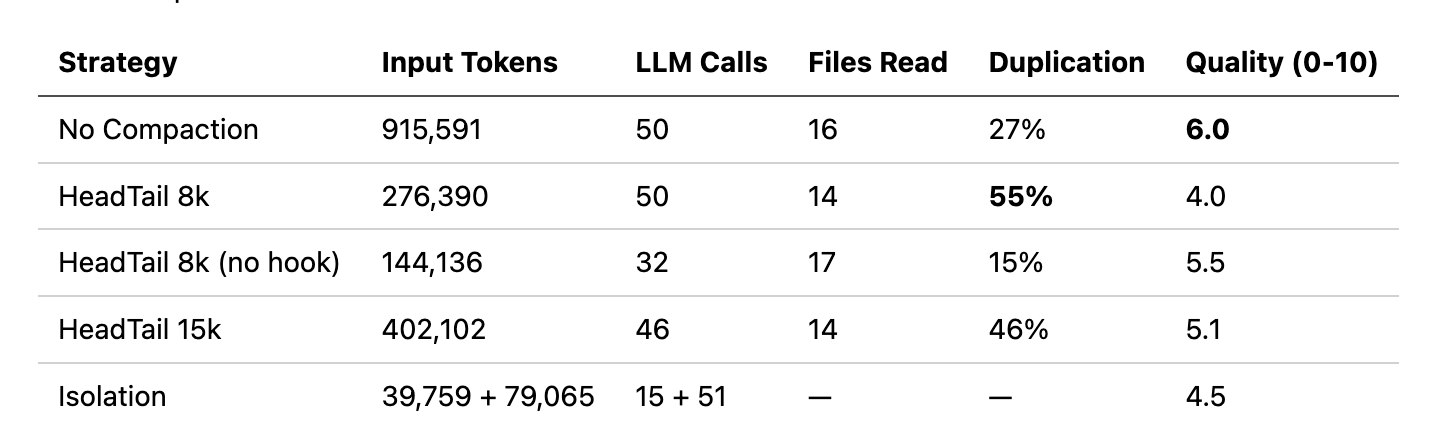
To illustrate the tradeoffs, I ran a code review task across five agent configurations using PicoAgents’ evaluation system. The task: review a 44-file Python repository, read every .py file, document all classes and functions, and produce a quality assessment. All agents use the same model (gpt-4.1-mini), the same two tools (read_file, list_directory), and the same system prompt. The only variables are context strategy and whether a completion hook is enabled.
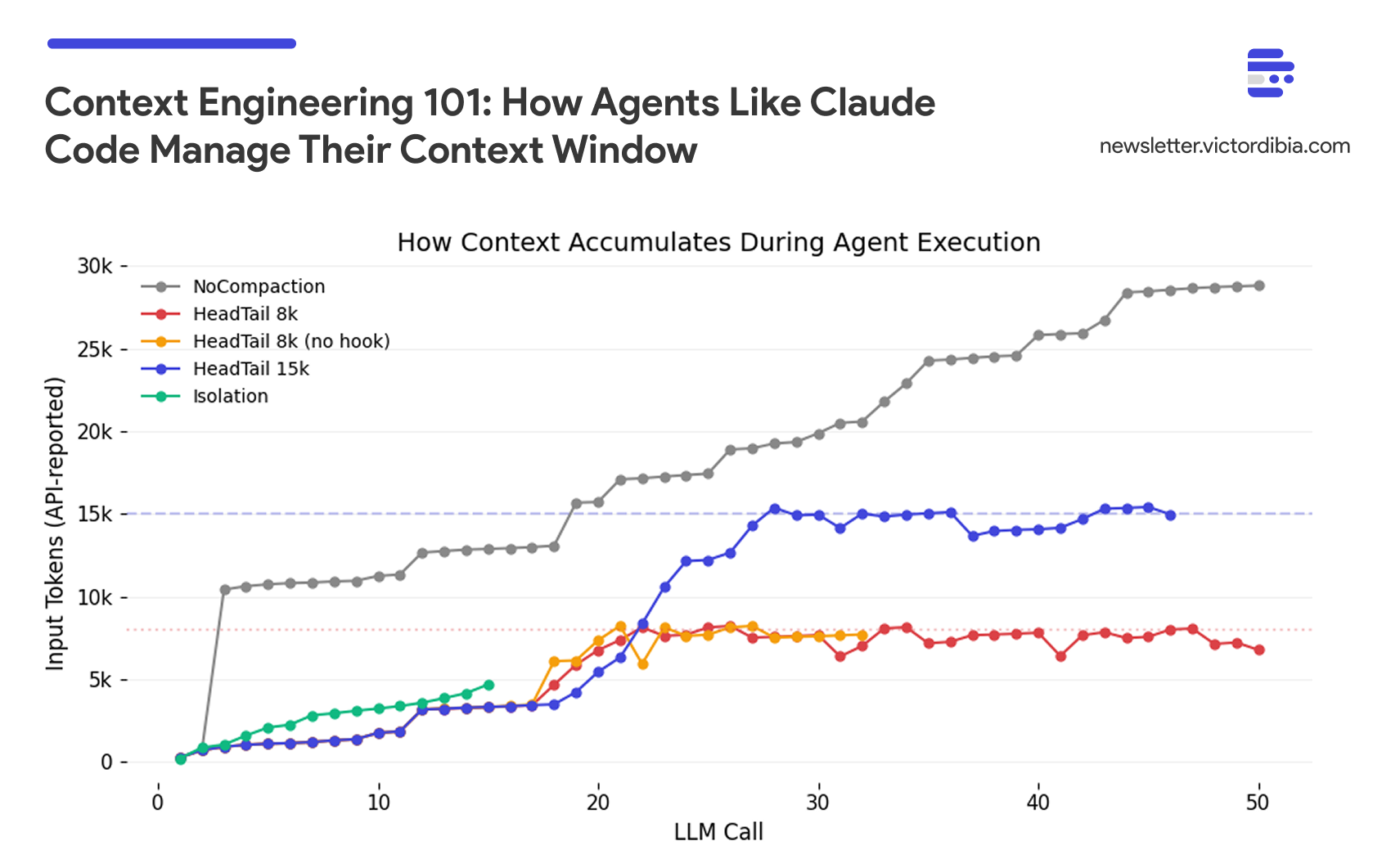
The five configurations:
No Compaction: Full context carried forward, no trimming. Completion hook forces the agent to keep working until the task is done (up to 50 iterations).
HeadTail 8k: Head+tail compaction with an 8k token budget (20% head, 80% tail). Same completion hook.
HeadTail 8k (no hook): Same 8k compaction, but no completion hook; the agent stops when it does not call any additional tools.
HeadTail 15k: Head+tail with a larger 15k token budget. Completion hook enabled.
Isolation: A coordinator delegates to sub-agents via
as_tool(). Each sub-agent has its own 50k HeadTail budget. No completion hook on the coordinator.
The completion hook fires when the agent would normally stop (no more tool calls). It summarizes the conversation so far, asks a judge LLM “is this task complete?”, and if not, injects a message telling the agent to continue. This gives the agent cognitive durability — the ability to persist through long tasks — but adds iterations (and tokens) each time it restarts.
A note on evaluation: Quality scores come from an LLM-as-judge, which introduces its own variance. Building confidence in these numbers requires inspecting the judge’s rationale for each score, ensuring the judge sees the full agent trace, and providing ground truth references (e.g., the repository has 44 .py files; did the agent find them?). With single runs, treat the scores as directional signals, not precise measurements. I’ll cover LLM judge design in detail in a future post.
Several patterns emerge:
No compaction works, but it’s expensive. NoCompaction scored highest (6.0) by brute-forcing - carrying full history across 50 iterations, 915k tokens. The agent never forgets what it read, so it avoids re-reads (only 27% duplication). The tradeoff is cost: 2-6x more tokens than compacted agents, and 22 minutes of wall time.
