

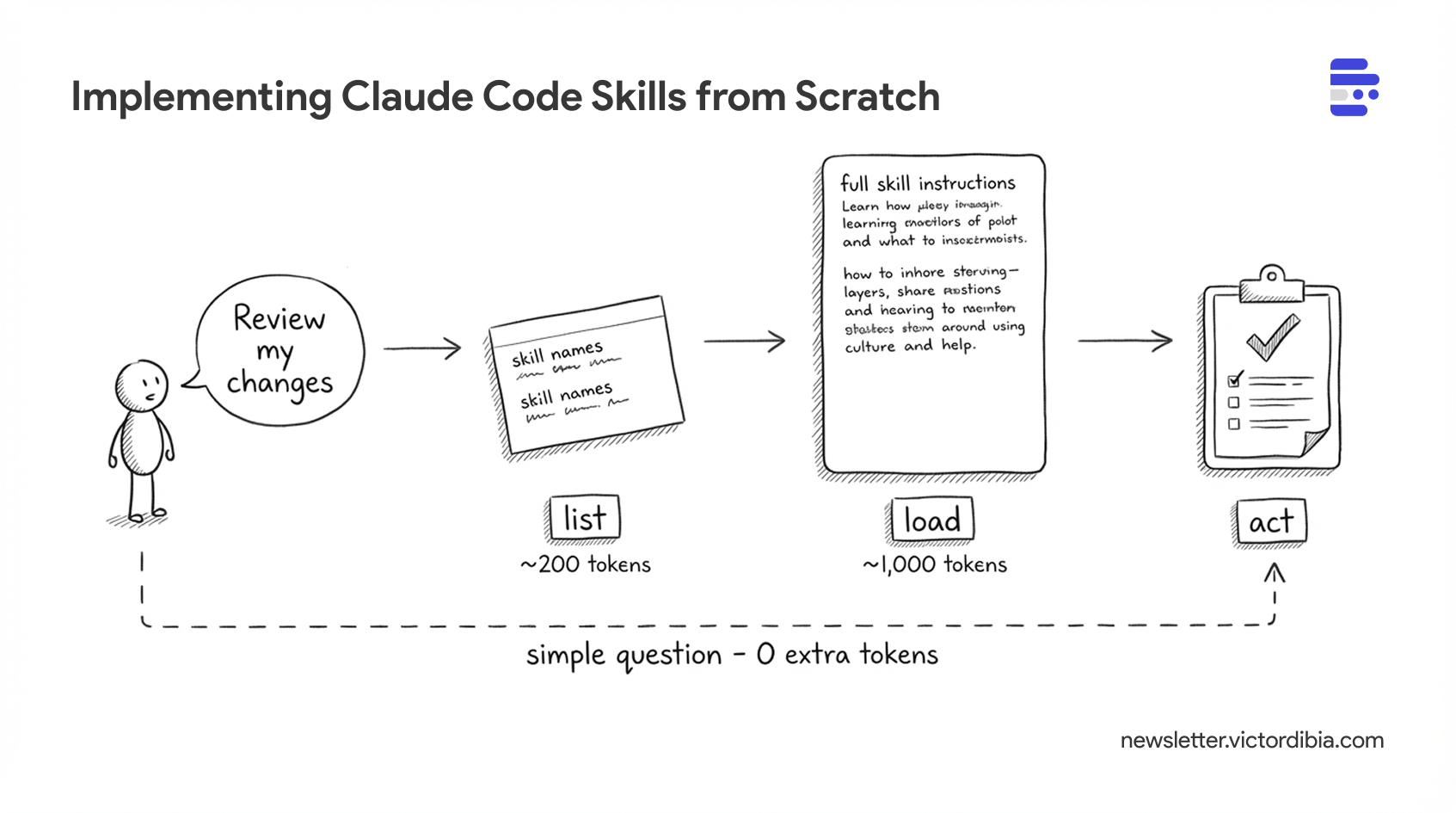
Agents can act by calling tools, executing code, or following instructions, but doing so efficiently has massive implications for context window usage and security. One approach now supported by Claude Code, Cursor, Gemini CLI, and a growing list of coding agents is skills. A skill is a folder of instructions and scripts that an agent can discover and load on demand. Unlike a CLAUDE.md or system prompt that sits in context permanently, skills extend context only when needed - the agent sees a one-line description at startup (~100 tokens) and pulls in full instructions only when the task matches (~2,000 tokens). With 20 skills, that's ~2,000 tokens at startup instead of ~40,000. You define a SKILL.md file once, and any compatible agent can use it.

Importantly, this pattern is now an open standard adopted by 25+ tools - you can define a skills folder with a SKILL.md file once, and any compatible agent can use it.
How does it work under the hood? And how would you implement skills support to your own agent (in any framework of your choice)? Well, that’s what this post attempts to lay out.
I will also share a complete implementation of a SkillsTool in PicoAgents, the companion framework from Designing Multi-Agent Systems book. If you are interested in learning about how agents or agent frameworks work, consider grabbing a copy of the book!
This post is adapted from Designing Multi-Agent Systems. The book covers tool design, context management, and agent orchestration patterns in more depth with complete implementation code.
What Is a Skill?
A skill is a folder containing a SKILL.md file with two parts: YAML frontmatter (metadata) and markdown content (instructions).
Here’s a commit skill based on Claude Code’s built-in skills:
---
name: commit
description: Create a git commit
allowed-tools: Bash(git add:*), Bash(git status:*), Bash(git commit:*)
---

## Context

- Current git status: !`git status`
- Current git diff: !`git diff HEAD`
- Current branch: !`git branch --show-current`
- Recent commits: !`git log --oneline -10`

## Your task

Based on the above changes, create a single git commit.
Stage and create the commit using a single message.
Do not use any other tools or do anything else.
That’s the entire skill. A skill is:
Metadata (frontmatter) - name, description, and optionally which tools it needs
Instructions (body) - what the agent should do when the skill is activated
The directory structure looks like this:
skills/
├── commit/
│   └── SKILL.md
├── code-review/
│   ├── SKILL.md
│   ├── examples/
│   │   └── sample-review.md
│   └── scripts/
│       └── diff-analyzer.py
└── debug/
    └── SKILL.md
Each skill is self-contained. The SKILL.md is required; everything else - scripts, templates, reference docs - is optional.
Instructions vs Skills vs Tools
While all three are ways to extend what the agent can do, there are differences in terms of when they are loaded, the cost in terms of context usage and execution patters. Examples of each
Instructions: “always do X.”;
Tools:
get_weather(city).Skill: “when the user asks for a code review, follow this checklist and use these tools.”
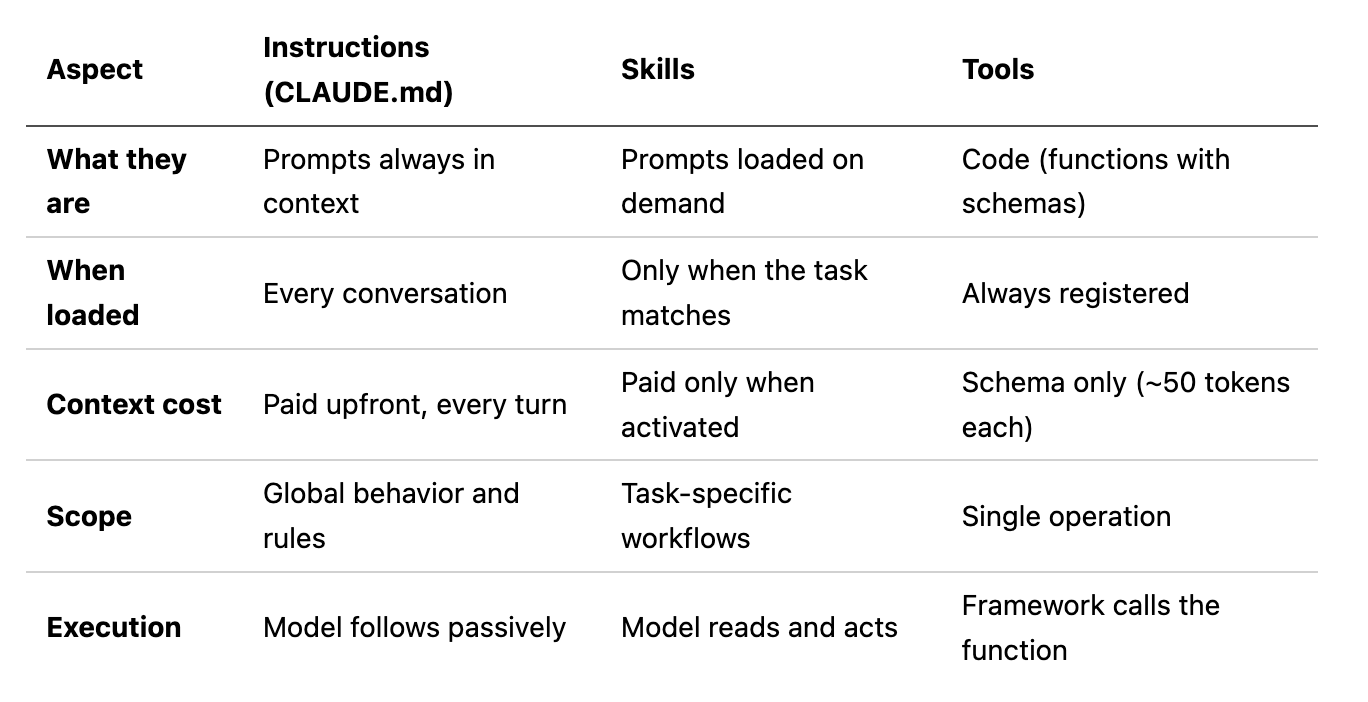
Skills are useful when a task requires deep domain knowledge or multi-step orchestration that the agent may or may not encounter during a run - too detailed and specialized for primary context, but too complex for a single tool call. They sit between global instructions and atomic tools: task-specific prompts that load into context only when relevant.
Skills can also bundle scripts, reference docs, and assets alongside the SKILL.md - the instructions tell the agent when and how to use them.
Progressive Disclosure
Skills use a three-tier loading strategy to manage context efficiently. From the Agent Skills specification:
Metadata (~100 tokens): The
nameanddescriptionfields are loaded at startup for all skillsInstructions (< 5,000 tokens recommended): The full
SKILL.mdbody is loaded when the skill is activatedResources (as needed): Files in
scripts/,references/, orassets/are loaded only when required
This is progressive disclosure applied to agent context. At startup, the agent knows what skills exist (just names and descriptions) as these are added to the context on load. Only when a skill is needed does the full content load into the conversation.
From Claude Code’s documentation:
“In a regular session, skill descriptions are loaded into context so Claude knows what’s available, but full skill content only loads when invoked.”
Why does this matter? Because context is expensive. If you have 20 skills averaging 2,000 tokens each, eagerly loading all of them would consume 40,000 tokens before the agent does anything. With progressive disclosure, you spend ~2,000 tokens on metadata (100 tokens x 20 skills) and only load the ~2,000 tokens of instructions for the skill that’s actually needed.
How Skills Are Implemented
From the Agent Skills integration guide:
Skills have two parts: metadata injection and a load tool.
At startup, skill names and descriptions are injected into the system prompt so the model knows what’s available:
<available_skills>
  <skill>
    <name>code-review</name>
    <description>Review code changes for bugs, security issues, and improvements</description>
  </skill>
  <skill>
    <name>debug</name>
    <description>Systematic approach to debugging errors and unexpected behavior</description>
  </skill>
</available_skills>
The model also gets a skills tool (or Skill in Claude Code) with a load operation. When a task matches a skill, the model calls skills(action='load', name='code-review') and gets the full SKILL.md body back as a tool result - instructions that now appear in context for the model to follow.
Implementing Skills in Your Agent
The implementation has three parts: a SKILL.md parser, a discovery mechanism, and a tool the agent can call.
Parsing, Discovery, and the Skills Tool
The SKILL.md format is what we saw above - YAML frontmatter + markdown body. The implementation needs to parse that, scan directories for skill folders, and expose a tool the agent can call. In pseudocode:
class SkillsTool:
    def discover(skills_path) -> {name: (path, metadata)}:
        # scan directories for folders containing SKILL.md
        # parse each: split on "---", extract name + description

    def get_system_prompt_section() -> str:
        # inject skill metadata into system prompt at startup
        # "Available Skills: code-review: Review code changes..."

    def execute(action, name=""):
        if action == "load":
            return full SKILL.md body  # ~2,000 tokens, loaded on demand
The full implementation is in SkillsTool (~80 lines of Python).
Wiring It to an Agent
The tool gets added to the agent like any other tool. At startup, get_system_prompt_section() appends skill metadata to the agent’s instructions so the model knows what’s available without an extra tool call:
from picoagents import Agent
from picoagents.tools import SkillsTool

skills_tool = SkillsTool(
    builtin_path=Path("./skills"),         # shipped with your app
    project_path=Path("./.claude/skills"),  # project-specific
)

agent = Agent(
    name="assistant",
    instructions="You are a helpful assistant.\n" + skills_tool.get_system_prompt_section(),
    model_client=client,
    tools=[skills_tool, *other_tools],
)
When the user says “review this code,” the model sees code-review in its system prompt, calls skills(action='load', name='code-review'), gets the full instructions back as a tool result, and follows them.
What This Looks Like in Practice
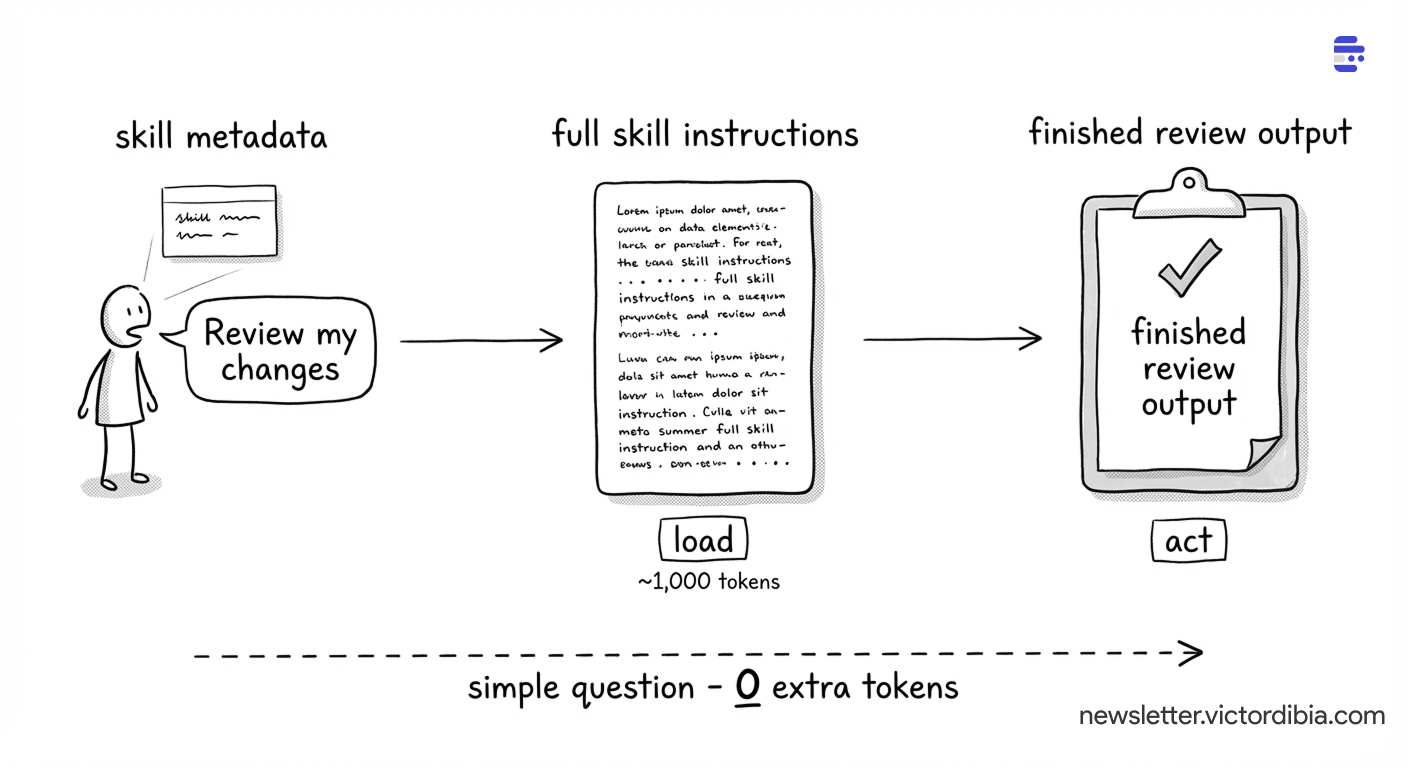
A concrete trace:
1. Agent starts. Skill metadata is injected into the system prompt (~100 tokens per skill). The model sees skill names and descriptions from the first turn.
2. User asks: “Can you review the changes I made?”
3. Model loads the matching skill. It already knows code-review exists from the system prompt. Calls skills(action='load', name='code-review'). Gets back the full review checklist - correctness, security, performance, maintainability - plus the review format template (~1,000 tokens).
4. Model follows the instructions. It reads the diff, checks each file against the checklist, and produces a structured review with severity levels.
The load in step 3 only happens when needed. If the user had asked a simple question, no skill would load and those ~1,000 tokens are never spent.
